Where it started
The application PDFly was first mentioned by Luke Acha on X.
PDFClick is a very similar sample. I do not remember where I got it from. Images below are partially from one and partially from the other sample as I worked on them simulaneously.
- 09474277051fc387a9b43f7f08a9bf4f6817c24768719b21f9f7163d9c5c8f74 (PDFClick)
- 8c9d9150efa35278afcb23f2af4c4babcc4dd55acd9e839bed4c04cb5a8d9c3f (PDFLy)
Solution script: pyinstaller-mod-extractor-ng.py
Note: This article only describes the extraction and decryption of the Python bytecode, it does not analyze these samples.
Manual extraction
This sample is a PyInstaller executable. Usually I use pyinstxtractor-ng to extract the contents. However, for this sample this does not work. It does not recognize the file as PyInstaller executable. I add print outputs to the pyinstxtractor-ng.py script and figure out that the MAGIC aka cookie isn't found.
So I open the file in IDA. This PyInstaller stub has been modified, many strings contain partial garbage. The cookie is also different as you can see below in variable local_80.
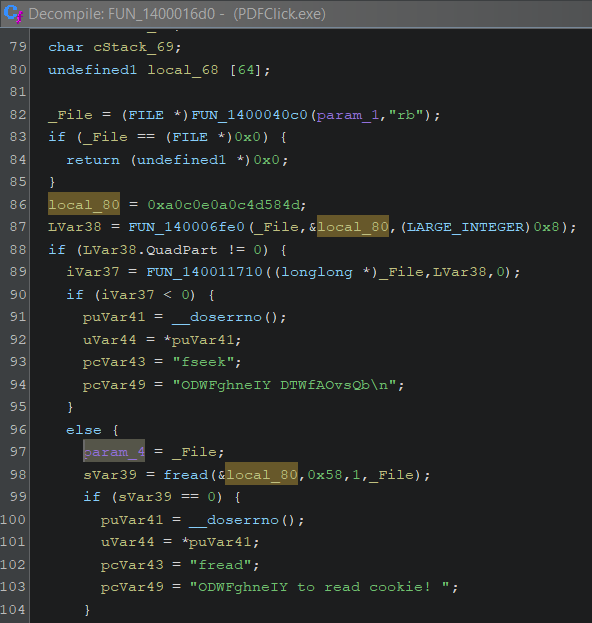
So I replace the magic in the pyinstxtractor-ng.py script and try again. This time an assert that looks for "PYZ\0" fails. The assertion is not necessary for the code to function, so I simply remove it.
Now pyinstxtractor-ng.py extracts files but the contents of the PYZ archive are encrypted.
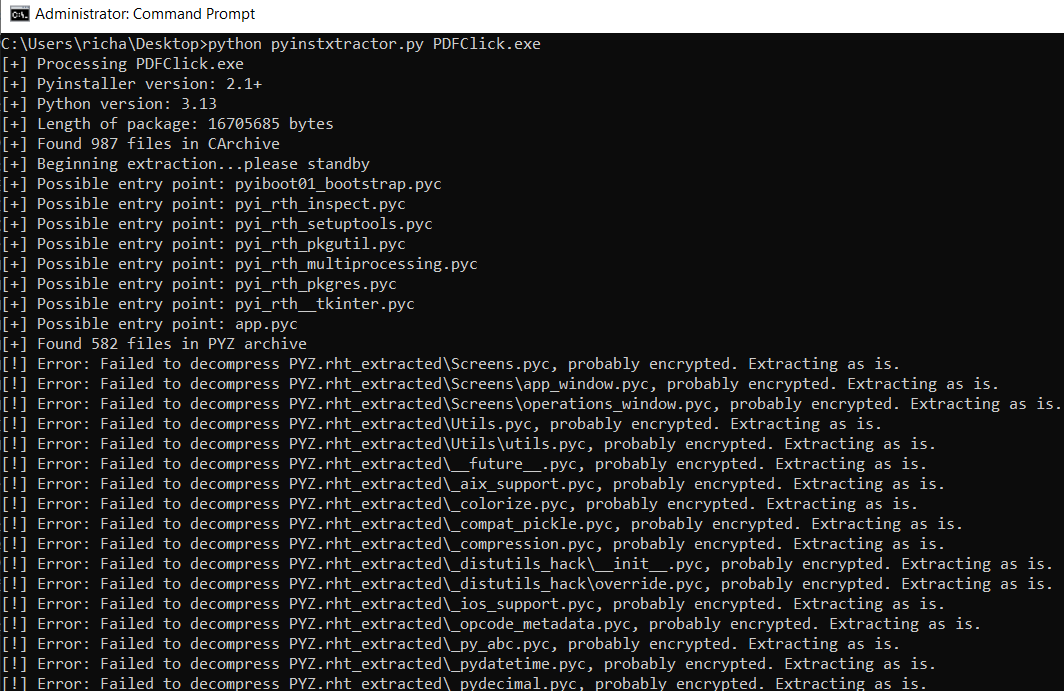
I search for signs of encryption algorithms with CAPA and IDAScope but there is only the compression function. Decompression alone does not cut it. So these files must be encrypted somewhere else than in the PyInstaller stub. So I start checking the bootstrap and pyimod files in the root of the directory. These are not encrypted. The image below shows the files that catch my interest.
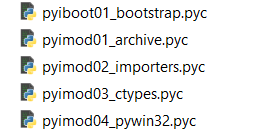
I decompile these files with PyLingual because that works with the newest Python versions and we have here a Python 3.13 bytecode. However, for pyimod01_archive.pyc I get only partial code -- which is already enough to see that this performs XOR decryption of the archived samples. The decompiled code only shows one XOR key because it is incomplete. So to get a complete picture, I disassemble the code instead. Since I am not too familiar with Python bytecode disassembly, I put the disassembled code into ClaudeAI. Even if it hallucinates, this is a safe operation because if my extractor works, I have proof that this is the actual algorithm.
Below you can see an excerpt of the dissembled code.
XOR decryption:
80  LOAD_GLOBAL 19 (NULL + bytes)
82  LOAD_CONST 5 (code object <genexpr>)    # Generator for XOR
84  MAKE_FUNCTION
86  LOAD_GLOBAL 21 (NULL + enumerate)
88  LOAD_FAST_CHECK 8 (obj)                 # Load raw encrypted data
90  CALL 1 (1 positional)
92  GET_ITER
94  CALL 0 (0 positional)
96  CALL 1 (1 positional)
98  STORE_FAST 8 (obj)                      # Store XOR'd result back to obj

Generator referenced at instruction 82
14  LOAD_FAST 2 (b)
16  LOAD_CONST 0 (b'SCbZtkeMKAvyU')         # First XOR key
18  LOAD_FAST 1 (i)
20  LOAD_GLOBAL 1 (NULL + len)
22  LOAD_CONST 0 (b'SCbZtkeMKAvyU')
24  CALL 1 (1 positional)
26  BINARY_OP 6 (%)                          # i % 13
28  BINARY_SUBSCR                            # key[i % 13]
30  BINARY_OP 12 (^)                         # XOR operation

Decompression:
100 LOAD_GLOBAL 22 (zlib)
102 LOAD_ATTR 24 (decompress)
104 PUSH_NULL
106 LOAD_FAST 8 (obj)                       # Load XOR'd data
108 CALL 1 (1 positional)                   # zlib.decompress(obj)
110 STORE_FAST 8 (obj)                      # Store decompressed result

Second XOR:
112 LOAD_GLOBAL 19 (NULL + bytes)
114 LOAD_CONST 6 (code object <genexpr>)    # Second generator for XOR
116 MAKE_FUNCTION
118 LOAD_GLOBAL 21 (NULL + enumerate)
120 LOAD_FAST 8 (obj)                       # Load decompressed data
122 CALL 1 (1 positional)
124 GET_ITER
126 CALL 0 (0 positional)
128 CALL 1 (1 positional)
130 STORE_FAST 8 (obj)                      # Store second XOR'd result

Second generator referenced at instruction 114:
14  LOAD_FAST 2 (b)
16  LOAD_CONST 0 (b'KYFrLmy')               # Second XOR key (7 bytes!)
18  LOAD_FAST 1 (i)
20  LOAD_GLOBAL 1 (NULL + len)
22  LOAD_CONST 0 (b'KYFrLmy')
24  CALL 1 (1 positional)
26  BINARY_OP 6 (%)                          # i % 7
28  BINARY_SUBSCR                            # key[i % 7]
30  BINARY_OP 12 (^)                         # XOR operation
That means we have the following algorithm
- XOR with
SCbZtkeMKAvyU - zlib decompress
- XOR with
KYFrLmy - Reverse
- Unmarshal
So modify pyinstxtractor-ng.py to perform these specific operations, which successfully extracts and decrypts the files.
data = bytes(b ^ xor_key1[i % len(xor_key1)] for i, b in enumerate(data))
data = zlib.decompress(data)
data = bytes(b ^ xor_key2[i % len(xor_key2)] for i, b in enumerate(data))
data = data[::-1]
Generic extraction
Because I have several samples with different cookies and XOR keys, I decide to create a generic extractor.
At first I add a cookie finder which starts searching at the start of the overlay, assumes it is a cookie and checks if the extracted values for the table-of-contents and such make sense. If they don't it tries the next offset as cookie.
def find_pyinstaller_magic(filename):
    print("[+] Testing cookie locations, this may take a bit ...")
    try:
        pe = pefile.PE(filename)
        overlay_offset = pe.get_overlay_data_start_offset()

        if overlay_offset is None:
            print(f"[ERROR] No PE overlay found")
            return None

    except:
        print(f"[ERROR] Could not parse as PE file")
        return None

    with open(filename, 'rb') as f:
        data = f.read()

    # Search from the overlay start to the end of file
    for i in range(overlay_offset, len(data) - 32):
        try:
            # Try to parse as a cookie structure
            # 8 bytes magic + 4 bytes pkg_len + 4 bytes toc_offset + 4 bytes toc_len + 4 bytes pyver
            pkg_len = struct.unpack('!I', data[i+8:i+12])[0]
            toc_offset = struct.unpack('!I', data[i+12:i+16])[0]
            toc_len = struct.unpack('!I', data[i+16:i+20])[0]
            pyver = struct.unpack('!I', data[i+20:i+24])[0]

            # Validate the structure
            if (0 < pkg_len < len(data) and
                0 < toc_offset < pkg_len and
                0 < toc_len < pkg_len and
                20 <= pyver <= 400):
                # This looks like a valid cookie, extract the 8-byte magic
                magic = data[i:i+8]
                print(f"[+] Found valid cookie at: 0x{i:x}")
                return magic
        except:
            continue

    print(f"[DEBUG] No valid magic found in overlay")
    return None
To extract the XOR keys, I want to parse the bytecode of pyimod01_archive.pyc.
Python's code objects have many attributes that all start with co_ (short for "code object"), e.g.:
- co_consts - constants used in the code
- co_name - the name of the function/class
To get the keys, we look for the extract method in the ZlibArchiveReader object and inside of that we look for <genexpr> constants. The following is the extraction function:
    def extract_xor_keys_from_pyc(self, pyc_path):
        """
        Extract BOTH XOR keys from pyimod01_archive.pyc
        Returns a tuple of (key1, key2) as bytes, or (None, None) if not found.
        """
        try:
            with open(pyc_path, 'rb') as f:
                # Skip the pyc header (16 bytes for Python 3.7+)
                f.read(16)

                # Load the code object
                code = marshal.load(f)

            # Find the ZlibArchiveReader class
            for const in code.co_consts:
                if hasattr(const, 'co_name') and const.co_name == 'ZlibArchiveReader':
                    # Found the class, now find the extract method
                    for class_const in const.co_consts:
                        if hasattr(class_const, 'co_name') and class_const.co_name == 'extract':
                            # Found extract method, collect all XOR keys from genexpr
                            xor_keys = []
                            for extract_const in class_const.co_consts:
                                if hasattr(extract_const, 'co_name') and extract_const.co_name == '<genexpr>':
                                    # Check if this genexpr has a bytes constant (the XOR key)
                                    for genexpr_const in extract_const.co_consts:
                                        if isinstance(genexpr_const, bytes) and len(genexpr_const) > 0:
                                            xor_keys.append(genexpr_const)

                            if len(xor_keys) >= 2:
                                print(f"[+] Found XOR key 1: {xor_keys[0]}")
                                print(f"[+] Found XOR key 2: {xor_keys[1]}")
                                return xor_keys[0], xor_keys[1]
                            elif len(xor_keys) == 1:
                                print(f"[!] Only found one XOR key: {xor_keys[0]}")
                                return xor_keys[0], None
                            else:
                                print(f"[!] No XOR keys found in genexpr")
        except Exception as e:
            print(f"[!] Error extracting XOR keys: {e}")
            import traceback
            traceback.print_exc()

        return None, None
I adjust cookie and XOR keys by plugging in these functions and now the script successfully extracts and decrypts python bytecode and PYZ archives from multiple samples.
You can get the full script from my hedgehog-tools repo.