Let's handle this sample entirely using only the malware analysis tool, Malcat. Just for fun. The following two questions are what will be guiding this analysis:
1. Where does this office document get the next stage and how?
2. When was the document created?
What type of file is it?
Dragging and dropping the sample into an open Malcat window shows that it is a CFB file when the tab bar is clicked.
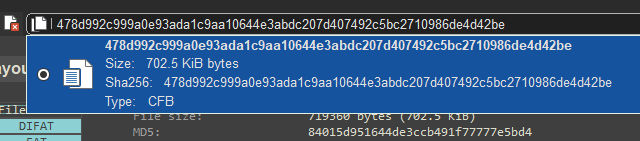
CFB files are Compound File Binary files, which are usually legacy Microsoft documents [1].
Finding possible IOCs
Looking at the extracted contents of the archived CFB sample by looking in the Files window, we can find an OLE object named Ole.
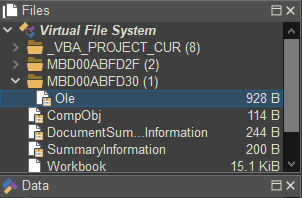
OLE objects are structures that can contain something malicious embedded, so it's a great candidate to look into [2].
An interesting OLE stream
Double-clicking the Ole file and looking at the [Structures / text] tab on the top right shows that the file has a suspicious AbsoluteSourceMonikerStream. This structure specifies the reference to a linked object as a file path or URL [3].
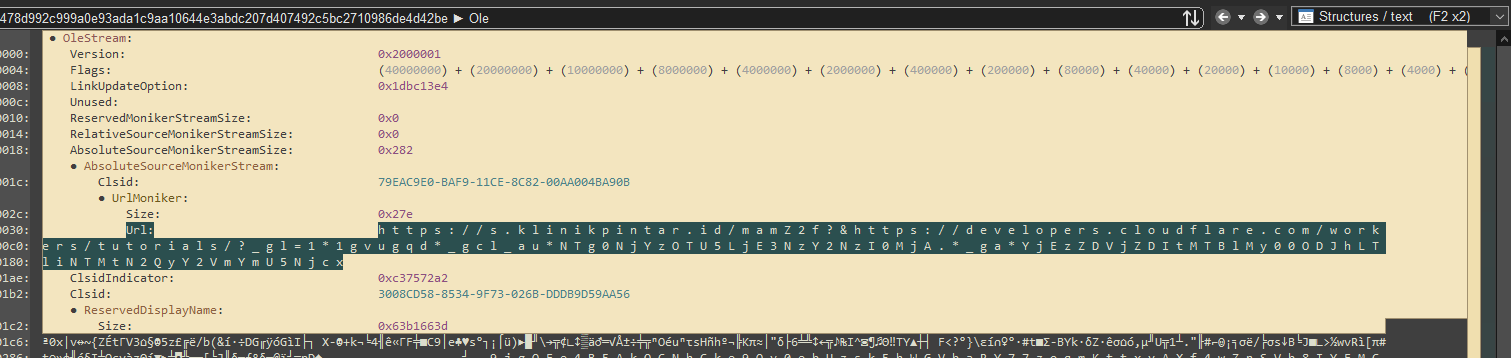
The URL that is specified as a linked resource is indeed where this document is getting the next stage from: hxxps[://]s[.]klinikpintar[.]id/mamZ2f?&hxxps[://]developers[.]cloudflare[.]com/workers/tutorials/?_gl=1*1gvugqd*_gcl_au*NTg0NjYzOTU5LjE3NzY2NzI0MjA[.]*_ga*YjEzZDVjZDItMTBlMy00ODJhLTliNTMtN2QyY2VmYmU5Njcx (defanged)
The answer to question #1
We have figured out that this office document gets the next stage from the previous URL by linking it as a referenced object. Now, on to the next question: when was the document created?
Google Analytics
The malicious URL contains another interesting Cloudflare URL as a parameter. Along with this Cloudflare URL are three different Google Analytics cookies.
| Cookie | Purpose | Value |
|---|---|---|
| _gl | Cross-domain cookie ID [4] | 1*1gvugqd |
| _gcl_au | Measures ad click conversions [5] | NTg0NjYzOTU5LjE3NzY2NzI0MjA. |
| _ga | UUID to distinguish unique users [5] | YjEzZDVjZDItMTBlMy00ODJhLTliNTMtN2QyY2VmYmU5Njcx |
The ID-related cookies don't seem relevant, so let's look at the _gcl_au cookie.
Decoding the first layer
Selecting the cookie text from within the same [Structures / text] tab and clicking [Transform ...] brings a decoding and encoding window similar to CyberChef for the data. The string looks like it's base64 encoded, which would make sense for a URL parameter. So dragging the [base64 decode] plugin from the list on the left into the middle reveals the contents of the cookie:
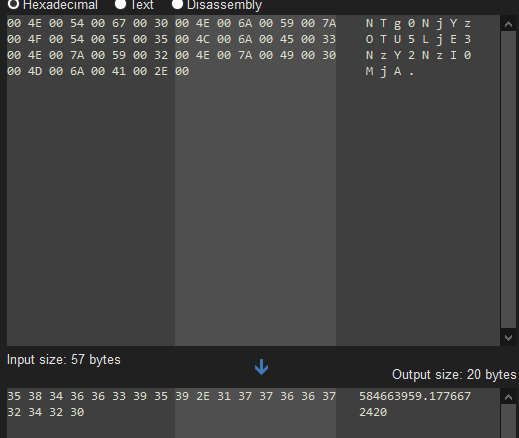
Revealed are two long integers separated by a period.
Decoding the second layer
There is very little documentation on what the _gcl_au cookie actually contains and what the integers mean, but every AI I asked hallucinated the same idea that the last integer contains a Unix timestamp (without giving a clear source). This seems to make sense considering the structure of such things, so let's believe the AI on this one. With this in mind, we can drag the [user code (python)] plugin to the middle in this same [Transform selection] window. Clicking the [Edit python code] button takes us to where we can describe our own transformation for the data.
I wrote the following code for it:
from datetime import datetime, timezone

def operation(input:bytes):
    timestamp = float(input.decode("utf-8").split(".")[-1])
    utc_date = datetime.fromtimestamp(timestamp, timezone.utc)

    return utc_date.isoformat().encode("utf-8")
The input coming from the previous layer is sent as a byte-array buffer by Malcat, so we first UTF-8 decode it. Then, we extract the last integer from the string and convert it to a float. The datetime library then does its magic to convert it into a UTC date. To preserve the string formatting, we ISO format the UTC date and then encode it into a UTF-8 string as raw bytes. This is returned and sent back to the [Transform selection] window by Malcat.
In conclusion, the final chain is as follows.
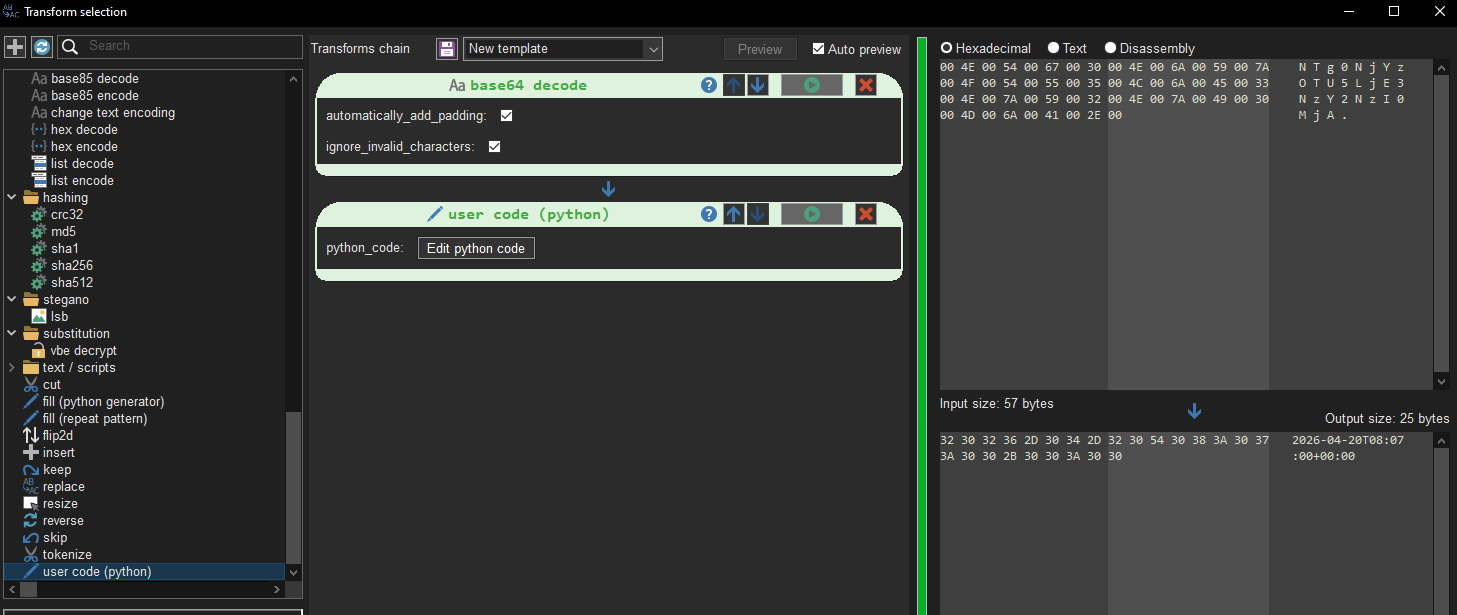
The chain from base64 decoding through to our custom logic reveals the date and time that the cookie was created (or refreshed at): 2026-04-20T08:07:00+00:00
The answer to question #2
If the tracking cookies for the Cloudfare link do in fact belong to the document's author, then we can safely assume that the document was created at around the same time on April 20, 2026.
References
[1] https://learn.microsoft.com/en-us/openspecs/windows_protocols/ms-cfb/53989ce4-7b05-4f8d-829b-d08d6148375b
[2] https://learn.microsoft.com/en-us/openspecs/windows_protocols/ms-oleds/e0dc105e-77f1-4072-a938-9aa516dc43e9
[3] https://learn.microsoft.com/en-us/openspecs/windows_protocols/ms-oleds/1fa40441-eb40-42f2-a310-3eee8d563053
[4] https://support.google.com/analytics/answer/10071811
[5] https://www.cookieyes.com/blog/google-cookies/