We begin at zero. Zero idea what this sample is and zero experience with binary refinery. The reason why I chose binary refinery as the tool for analyzing this sample is that I wanted to see if I could get to the solution with a one-line command. So begins the binref-learning speedrun...
The binref documentation will be our best friend today. In short, it seems that this python library consists of commands called units that take the output of previous commands as their input and then output their own result, which is raw hex in a lot of cases. The outputs get passed to the next command by using the pipe | character similarly to the Linux command-line. Furthermore, you can add -h at the end of the chain at any time to output the documentation of the last unit used, which makes things very convenient.
What does the sample look like
To take a look at the sample, I found the unit emit, which takes a file or chunk of data as an argument to be outputted. Since directly dumping the file contents to the command-line doesn't look very helpful (or pretty), the second unit peek comes in handy to pipe into and display a human readable output alongside some information about the file.
The output of the command emit 13063a496da7e490f35ebb4f24a138db4551d48a1d82c0c876906a03b8e83e05 | peek

Looking at the result, this sample is an encrypted OLE 2 Compound Document, which means a Microsoft Office document of some kind. Before we continue, we're probably going to be writing a long chain of commands, but it already is looking really long. Luckily, the ef unit can replace the emit unit in this case to pass a filename as a glob pattern to match. The previous command chain can be replaced with ef 1306* | peek and the result is the same.
Let's crack the super advanced next-level password
The next unit, officecrypt, decrypts Microsoft Office documents. The argument is the password for the document, of course, but it defaults to the default Excel password of VelvetSweatshop if none is provided. Let's give it a try.
The output of the command ef 1306* | officecrypt | peek
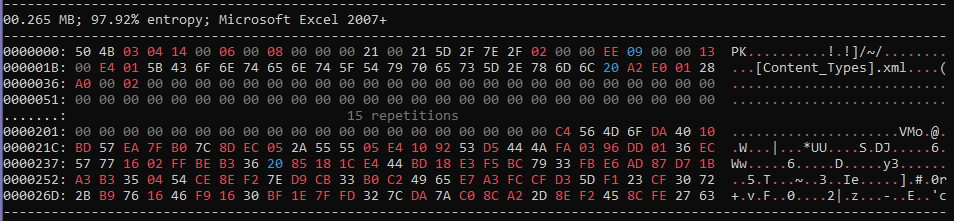
Yes, the sample decrypted with the default password and it is a Microsoft Excel 2007+ document. The purpose of the password is not necessarily to make the file inaccessible, because they still want it to be opened normally by the target. It seems that Excel automatically decrypts a file that has the default password, so the file is still going to be opened normally by a person. However, making it not easily readable outside of normal circumstances makes it harder to analyze, which was probably the purpose of encrypting it.
What's inside this document
The xt unit extracts files from container formats, which is what Excel documents are, and the -l argument lists the paths of the files as opposed to directly dumping all of the contents to the command-line (yes, I did this first without the -l 😅).
From the output of the command ef 1306* | officecrypt | xt -l
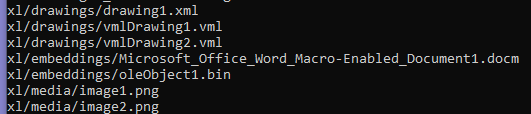
Looking through the contents, we find an interesting embedded object named oleObject1.bin.
What's inside what's inside this document
The OLE object is also a Compound File Format, so nesting another xt will show us its contents. It actually outputs a list, so to run a command on all the individual items of this list, it has to be put inside square brackets called frames.
The output of the command ef 1306* | officecrypt | xt "embed*.bin" | xt [| peek ]
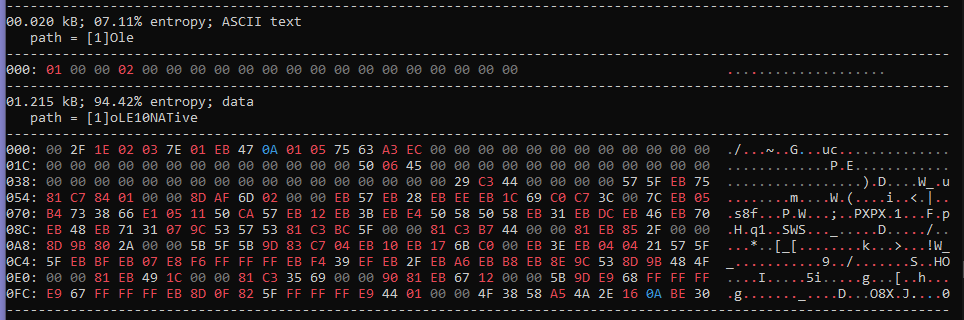
The second chunk of data called oLE10NATive is definitely unusual.
Help me sensei
At this point, I was stuck. But I asked for help on the discord and the creator of samplepedia as well as the creator of binary refinery itself took the time to guide me in the right direction (thank you 🙏). I learned that the asm unit can be used to disassemble the input data to see if anything fishy is going on with the OLE object.
From the output of the command ef 1306* | officecrypt | xt "embed*.bin" | xt "native" | asm
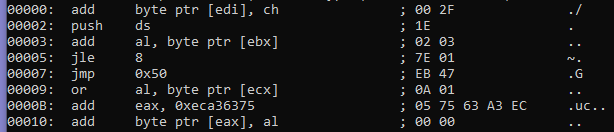
There's an interesting jump to the address 0x50 in the assembly, which continues with even more mysterious commands if you look at it.
Emulation nation
To get the data starting at offset 0x50, we can use the snip unit, which slices the data using syntax similar to Python. I'm not an expert in assembly, so emulating the code can be a nice alternative to see what's going on. Luckily, the vstack unit does just that. It also extracts data patches that are written to memory during emulation as its output.
The output of the command ef 1306* | officecrypt | xt "embed*.bin" | xt "native" | snip 0x50: | vstack

Something definitely seems incomplete since the output is very short, but we seem to be on the right track. Looking at the documentation with -h, we can see the -w argument for adjusting when the emulation halts, depending on how many instructions ran without tracking a memory write. The default parameters are 80:20:5, where 80 is the initial number of instructions to be halting at, 20 is the final decreased number of instructions to be halting at, and 5 is the amount to decrease by after each write to get from 80 to 20. Then it remains and stops the emulation once 20 instructions were executed without a memory write. I found myself making the first number bigger and the last two numbers smaller and adjusting depending on how much output I got. I am not sure if this is the right approach, but it worked.
The output of the command ef 1306* | officecrypt | xt "embed*.bin" | xt "native" | snip 0x50: | vstack -w 105:5:1

Bingo! We see a DownloadToFile mention along a suspicious looking URL. It seems we found the next stage download url 👏
P.S. make it pretty
We can use snip again to get only what we want and have a complete solution.
The output of the command ef 1306* | officecrypt | xt "embed*.bin" | xt "native" | snip 0x50: | vstack -w 105:5:1 | snip 0xED:0x12C

I got the last hex indices for the snip by looking at the output of vstack in peek and looking at where the url begins and ends. Great! Now we have a complete chain from the sample file all the way to just the next stage download url.
The evolution
This sample was fun. I am thankful for having a platform like this one to experiment and learn along the way. Here is a look at how our solution evolved from start to finish:
emit 13063a496da7e490f35ebb4f24a138db4551d48a1d82c0c876906a03b8e83e05 | peek
ef 1306* | peek
ef 1306* | officecrypt | peek
ef 1306* | officecrypt | xt -l
ef 1306* | officecrypt | xt "embed*.bin" | xt [| peek ]
ef 1306* | officecrypt | xt "embed*.bin" | xt "native" | asm
ef 1306* | officecrypt | xt "embed*.bin" | xt "native" | snip 0x50: | vstack
ef 1306* | officecrypt | xt "embed*.bin" | xt "native" | snip 0x50: | vstack -w 105:5:1
ef 1306* | officecrypt | xt "embed*.bin" | xt "native" | snip 0x50: | vstack -w 105:5:1 | snip 0xED:0x12C